Email Sending Strategies
Deliveryman AI provides three different strategies for scheduling and sending emails within a cold outreach campaign. Each strategy controls how new outreach emails and follow-up emails are distributed over time. Selecting the right strategy helps you optimize delivery speed, maintain domain reputation, and stay within your daily sending limits.
The three sending strategies are:
- Sequential Mode
- No Follow-up Limit Mode
- Balanced Mode (Recommended)
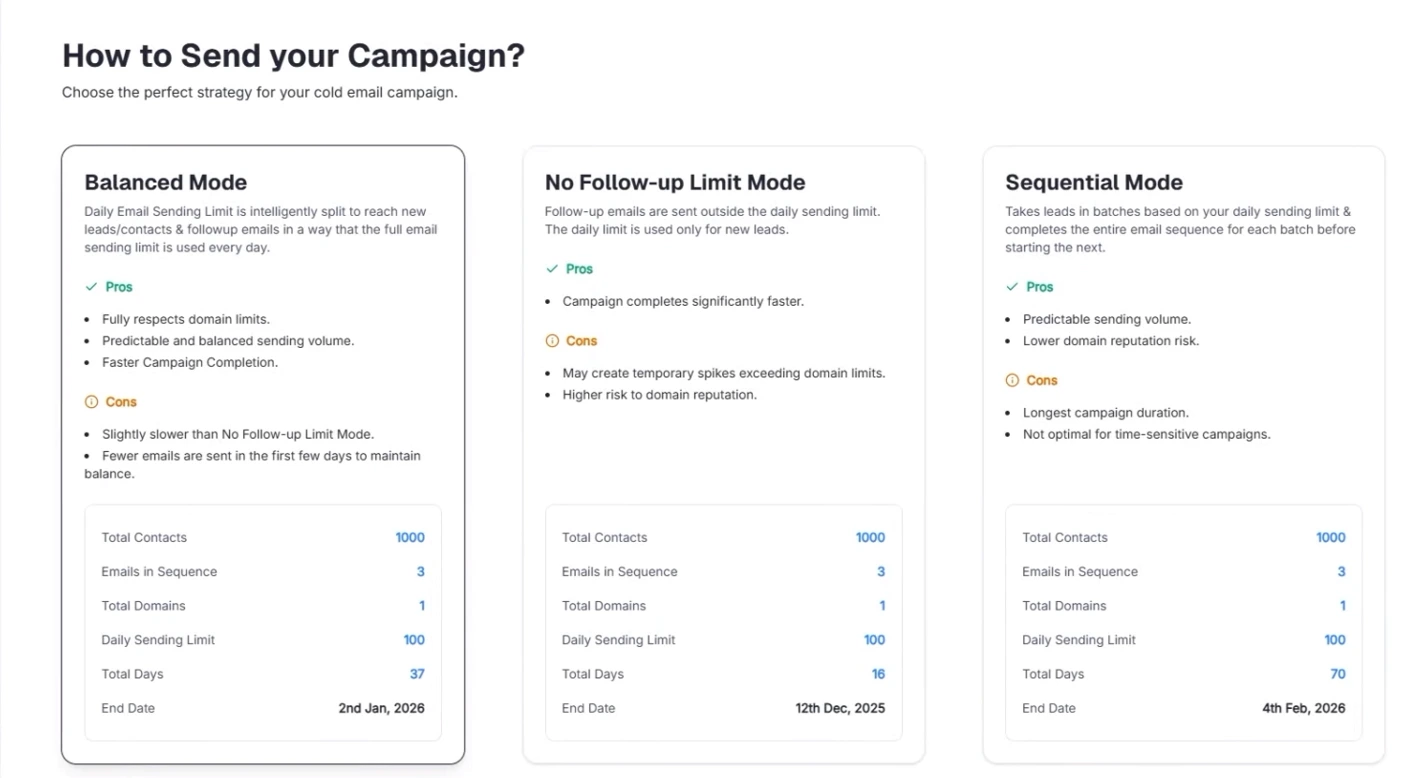
Below is a detailed explanation of how each strategy works.
Sequential Mode
Sequential Mode sends your contacts in smaller groups, known as batches. Each batch completes the entire email sequence before the next batch begins. All emails always count toward your daily sending limit.
How It Works
- Your contact list is divided into smaller batches (for example, 100 contacts per batch).
- The first batch receives the initial outreach email.
- Follow-up emails are sent to the same batch only after the defined delay (for example, a 2-day gap).
- During the delay period, no emails are sent for that batch.
- Once all follow-ups for the current batch are completed, the next batch starts.
This approach ensures that the daily sending limit is never exceeded, but it also creates idle days where no emails are sent, resulting in a longer overall campaign duration.
For example:
Assume a list of 1,000 contacts, where each contact receives three emails with a 2‑day gap between each.
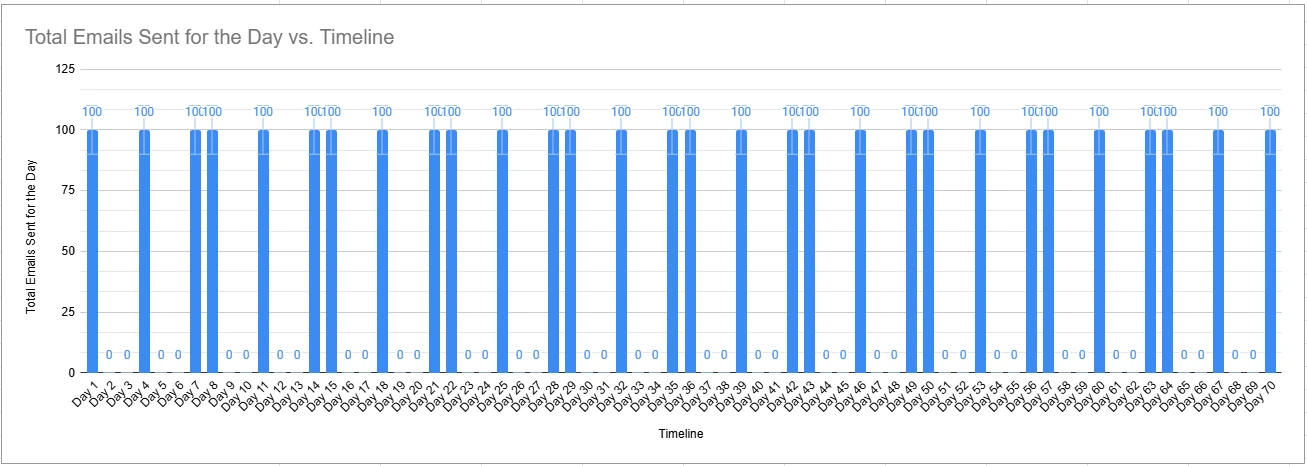
Day 1: Batch 1 - Send main emails to contacts 01–100 (Total Email send a day is 100)
Day 2: Idle Day (Total Email send on day 2 is 0)
Day 3: Idle Day (Total Email send on day 3 is 0)
Day 4: Batch 1 - First follow‑up to contacts 01–100 (Total Email send on day 4 is 100)
Day 5: Idle Day (Total Email send on day 5 is 0)
Day 6: Idle Day (Total Email send on day 6 is 0)
Day 7: Batch 1 - Second follow‑up to contacts 01–100 (Total Email send on day 7 is 100)
Day 8: Batch 2 - Send main emails to contacts 101–200 (Total Email send on day 8 is 100)
This sending pattern continues until the campaign is completed. It is safer but slow and there are idle days. If you run your campaign gradually then this is the best fit for you.\
Key Characteristics
- The total contact list is divided into batches.
- There are several idle days between each email step.
- The daily sending limit (e.g., 100 emails/day) is always respected.
- A campaign targeting 1,000 contacts, with 3 emails per contact spaced 2 days apart, takes about 70 days to complete.
Sending Pattern
Sequential Mode creates a wave-like pattern:
- A peak on the days when emails are sent
- Zero activity on the gap days
This is safe for domain reputation but results in the longest campaign duration.
No Follow-up Limit Mode
In this strategy, only new outreach emails count toward your daily sending limit. Follow-up emails do not count toward the limit and can be sent even when the limit is reached.
How It Works
- You still send up to your daily limit of new leads (e.g., 100 new contacts per day).
- Follow-up emails for previous batches are sent on top of the new sends.
- This causes the total number of emails sent in a day to exceed your configured limit.
For example:
Assume a list of 1,000 contacts, where each contact receives three emails with a 2‑day gap between each.
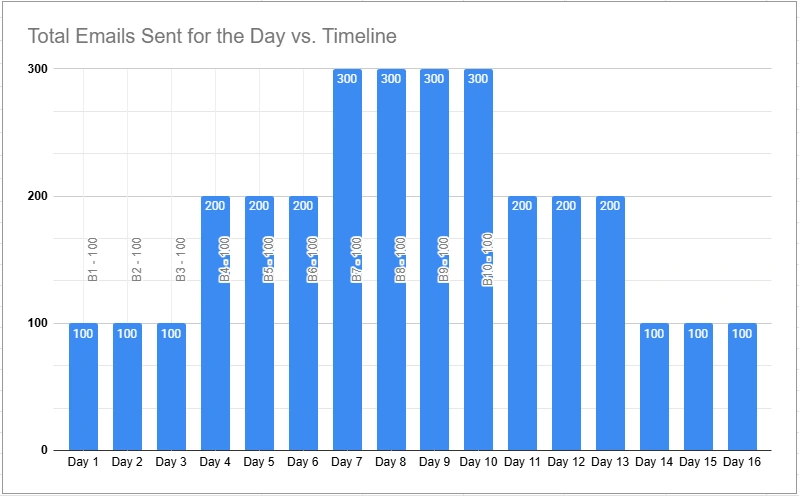
Day 1: Send emails to contacts 01–100 (Total Email send on day 1 is 100)
Day 2: Send emails to contacts 101–200 (Total Email send on day 2 is 100)
Day 3: Send emails to contacts 201–300 (Total Email send on day 3 is 100)
Day 4: Send emails to contacts 301–400 + First follow‑up to contacts 01–100 (Total Email sent on day 4 is 200)
Day 5: Send emails to contacts 401–500 + First follow‑up to contacts 101–200 (Total Email sent on day 5 is 200)
Day 6: Send emails to contacts 501–600 + First follow‑up to contacts 201–300 (Total Email sent on day 6 is 200)
Day 7: Send emails to contacts 601–700 + First follow‑up to contacts 301–400 + Second follow‑up to contacts 01–100 (Total Email sent on day 7 is 300)
Day 8: Send emails to contacts 701–800 + First follow‑up to contacts 401–500 + Second follow‑up to contacts 101–200 (Total Email sent on day 8 is 300)
This sending pattern continues until the campaign is completed. It is faster and allows unlimited follow‑up emails per day along with 100 new main emails daily. If you want to quickly complete the campaign, you should chose No Follow-up Limit Mode but again we dont recommend this as it may hurt Domain reputation.\
Key Characteristics
- Campaigns complete much faster compared to other two modes.
- Daily email volume may spike significantly above your limit.
- Because of these spikes, this strategy can negatively impact domain reputation.
- A campaign targeting 1,000 contacts, with 3 emails per contact spaced 2 days apart, takes about 16 days days to complete.
Sending Pattern
- The campaign starts at the daily limit.
- Volume increases sharply once follow-ups begin.
- Daily sends frequently exceed the configured limit.
- Sending volume becomes uneven and spiky.
Balanced Mode (Recommended)
Balanced Mode distributes new outreach emails and follow-up emails in a way that ensures the daily sending limit is used efficiently without exceeding it. This creates the most consistent and reputation-friendly sending pattern.
How It Works
Balanced Mode calculates:
- The maximum number of emails expected on the busiest day
- The number of follow-up steps in the sequence
Based on this, the system divides your list into evenly sized batches so that the total emails sent each day stay within your daily limit.
For Example:
Assume a list of 1,000 contacts, where each contact receives three emails with a 2‑day gap between each.
Day 1: Send main emails to contacts 01–33 (Total Email sent on day 1 is 33)
Day 2: Send main emails to contacts 34–66 (Total Email sent on day 2 is 33)
Day 3: Send main emails to contacts 67–99 (Total Email sent on day 3 is 33)
Day 4: Send main emails to contacts 100–132 + First follow‑up to contacts 01–33 (Total Email sent on day 4 is 66)
Day 5: Send main emails to contacts 133-165 + First follow‑up to contacts 34–66 (Total Email sent on day 5 is 66)
Day 6: Send main emails to contacts 166–198 + First follow‑up to contacts 67–99 (Total Email sent on day 6 is 66)
Day 7: Send main emails to contacts 199-231 + First follow‑up to contacts 100–132 + Second follow‑up to contacts 01–33 (Total Email sent on day 7 is 99)
Day 8: Send main emails to contacts 232-264 + First follow‑up to contacts 133-165 + Second follow‑up to contacts 34–66 (Total Email sent on day 8 is 99)
This sending pattern continues until the campaign is completed. This is neither quicker nor the slowest. This is the most balanced and effective Strategy and we highly recommend our users to choose Balanced Mode.
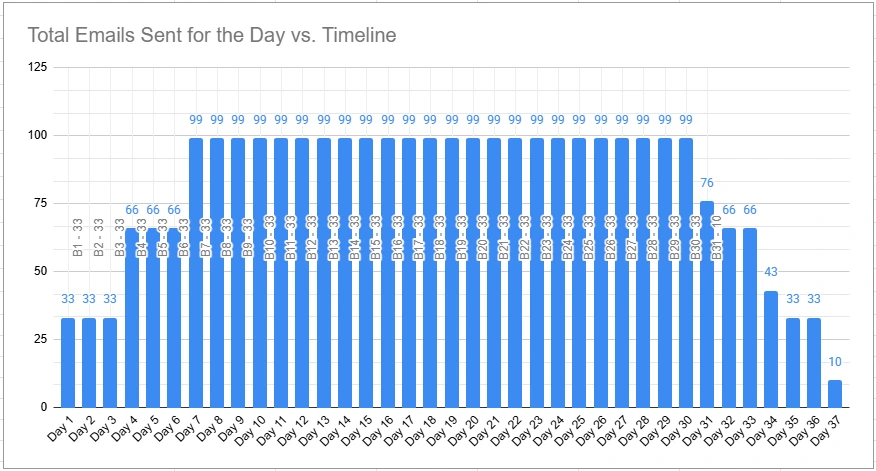
Instead of sending 100 new contacts per day, the system sends 33 per day. As follow-up emails begin, each day contains a mix of new emails and follow-ups. The total volume gradually increases, reaches the daily limit, and stays consistent.
Key Characteristics
- Adheres strictly to the daily sending limit.
- Avoids spikes in sending volume.
- Faster than Sequential Mode and safer than No Follow-up Limit Mode.
- A campaign targeting 1,000 contacts, with 3 emails per contact spaced 2 days apart, takes about 37 days to complete..
Sending Pattern
- Starts gradually
- Builds to a stable daily volume
- Remains steady
- Tapers off at the end
This is the healthiest pattern from a domain-reputation perspective.
Summary Comparison
| Strategy | Speed | Safety | Ideal For |
|---|---|---|---|
| Sequential Mode | Slowest | Very safe | Long-term, low-risk sending |
| No Follow-up Limit Mode | Fastest | Risky | Short-term speed priority |
| Balanced Mode (Recommended) | Fast + safe | Excellent | Most campaigns |
Balanced Mode offers the best combination of speed, consistency, and domain protection, making it the recommended strategy for most users.