Scheduling Emails
Scheduling controls when your emails are sent so they reach inboxes at the right time without hurting deliverability. Deliveryman AI lets you choose sending days, time windows, and timezones while automatically keeping your sending pattern safe and natural.
How Scheduling Works
When creating or editing a campaign, you can control three key things.
1. Select Sending Days
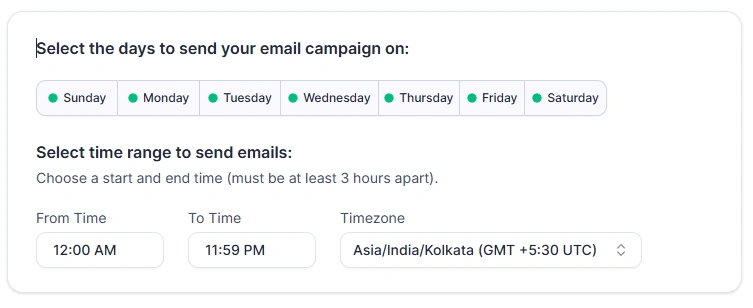
Choose the days when emails are allowed to send, from Monday to Sunday.
- Active days are shown with a green indicator.
- Click any day to turn it off.
- Common use cases include skipping weekends or avoiding low engagement days.
This helps you match your audience behavior and reduce low quality sends.
2. Set Timezone
Select the timezone you want your campaign to follow.
- Emails are sent based on the selected timezone, not your system time.
- This ensures emails land in inboxes during working or high response hours for your audience.
3. Pick a Time Range
Define the daily time window for sending emails.
- Emails are evenly distributed inside this range.
- Deliveryman AI avoids sending all emails at once.
- This prevents sudden volume spikes and keeps sending behavior human-like.
Example Schedule
If you choose:
- Days: Monday to Friday
- Time range: 1 PM to 9 PM
- Timezone: Asia/Calcutta UTC (+5:30)
Deliveryman AI will spread emails smoothly across this window each day while respecting your daily sending limits and campaign sequence.
Scheduling a Campaign Start
You can also schedule when a campaign should begin. How to schedule a campaign:
- Click Schedule Campaign in the top right corner.
- Select the start date and time.
- Confirm your selection.
The campaign will automatically start at the scheduled time and follow:
- Your sending days
- Your time window
- Your timezone
- Your daily limits and campaign mode
Important Notes
- Scheduling does not increase sending limits. Limits are always respected.
- Pausing a campaign stops all scheduled sends until resumed.
- Proper scheduling improves deliverability by avoiding unnatural sending patterns.
With smart scheduling, Deliveryman AI helps your emails arrive at the right time, in the right way, without manual monitoring or risk to your sender reputation.