Send Cold Emails using API via
Claude, ChatGPT, Gemini, Grok, Copilot
or any other AI Agent.
Plug in your own code or your AI agent with one API key. Deliveryman handles the mailboxes, warmup and deliverability behind every send.
Choose your setup.
Call the API from your own code, or let an AI agent call it for you. Both use the same API key.
Integrate with your own code.
Send from your app, CRM or backend with a simple REST API. JSON in, JSON out.
- One base URL: api.deliveryman.ai/api/v1/
- Authenticate with your key in the X-Api-Key header
- Webhooks for sends, opens, clicks, bounces and replies
curl -X POST https://api.deliveryman.ai/api/v2/send/ \
  -H "X-Api-Key: YOUR_API_KEY" \
  -H "Content-Type: application/json" \
  -d '{
    "from": "northwindlabs.com",
    "to": "olivia@acme.com",
    "subject": "Quick question about your outbound",
    "plain_text_content": "Hi Olivia, do you have 15 minutes this week?"
  }'
Send using your AI Agent.
Give your agent your API key and our AI-ready docs. Then just ask, and it sends the email and reads the replies.
Read the API docsPOST /api/v2/send/
→ 201 "status": "queued"
Sent from alex@northwindlabs.com. I'll let you know when Olivia replies.
- Claude
- ChatGPT
- Gemini
- Grok
- GitHub Copilot
- n8n
- Zapier
- Make
- Your own code
Build your own
AI SDR.
An agent that prospects, follows up and answers replies, sending through your own domains on Deliveryman.
Your agent
Picks the next leads, writes each email and decides how to answer every reply.
Deliveryman
Sends from your domains, paces every mailbox, keeps warmup running and suppresses bounces and unsubscribes.
You
Set the playbook, then take the conversations that are ready for a call.
AI SDR activity
Running today- 9:00Verified 120 new leads3 skipped
- 9:06Sent “Quick question about your outbound” to Olivia
- 9:14Sent a follow-up to Mark
- 11:42Olivia replied: “Sure, Thursday works.”Positive
- 11:43Answered in the same thread with two time slots
- 11:43Flagged Olivia for youReady for a call
- 14:10Mark asked not to be contacted. Added to suppression list
Your first email
in three steps.
- 1
Create an API key
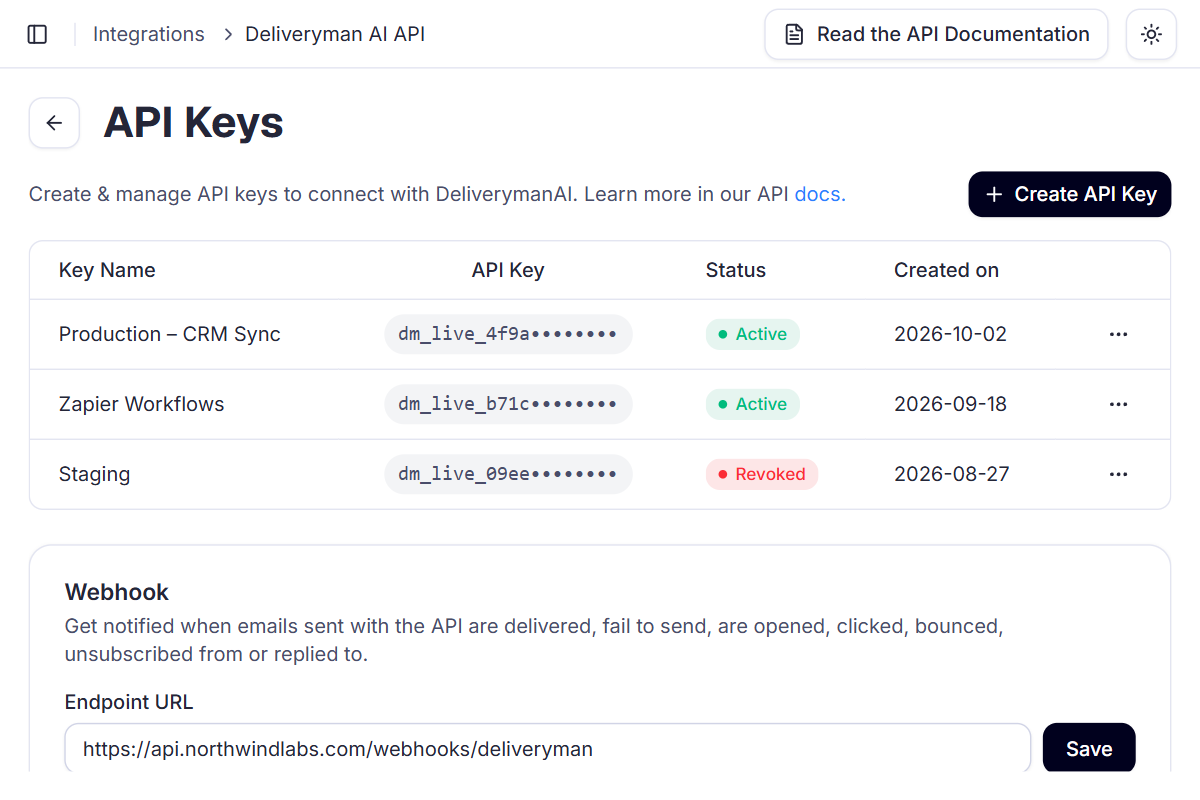
In Integrations, open Deliveryman API Keys and click Manage. Keep the key on your server.
- 2
Send your first email
POST to /api/v2/send/ and save the message_id you get back.
- 3
Add a webhook
Enter an https:// endpoint on the same page to get every event as it happens.
- 1Production – CRM Sync
dm_live_4f9a••••Active - 2
POST /api/v2/send/
→ 201 "message_id": "em_9f2c4a7b…"
- 3
Event received
sentapi.northwindlabs.com/webhooks/deliveryman
- Base URL
- api.deliveryman.ai/api/v2/
- Header
- X-Api-Key
 Ship cold email from your own product.
API access comes with every Deliveryman plan, alongside managed mailboxes, warmup, email verification and blacklist monitoring.
Frequently Asked Questions
What can I do with the Deliveryman API?
Send email from the domains connected to your account, check delivery status, opens, clicks and bounces, read and answer replies, verify addresses, manage your suppression list and get webhook events. Deliveryman handles the sending accounts, warmup and deliverability.
How do I authenticate?
Send your API key in the X-Api-Key header. Create keys in the dashboard under Integrations, in Deliveryman API Keys. A key has full access to your account, so keep it on your server and never in front-end code.
What is the base URL?
https://api.deliveryman.ai/api/v2/. Every V2 endpoint lives under it.
Do I need to pick a mailbox to send from?
No. Set from to a domain like northwindlabs.com and Deliveryman picks one of that domain's email accounts. You can also pass a full address if you want a specific sender.
How fast can I send?
Send Email accepts up to 60 requests per minute, and emails from one domain go out a minimum interval apart. We strongly recommend leaving 5 to 10 minutes between emails from the same domain to protect its reputation. Emails sent sooner are queued, not rejected. If you send 1 million or more emails a month, contact us and we can raise your limits.
How do I reply to someone who answered?
Call Send Email with the reply's message_id as reply_to_message_id. Your answer is threaded under the original conversation in the recipient's mail client.
Can I build an AI SDR with the API?
Yes. An AI agent can verify a lead, send the email from your domain, get the reply through a webhook or the inbox endpoint, and answer in the same thread with reply_to_message_id. You bring the leads and the agent; Deliveryman runs the mailboxes, warmup and send pacing.
Does the old V1 API still work?
Yes. The /api/v1/ endpoints for campaigns, contact lists, leads and sequences still work and are in maintenance. New features only go to V2, so new integrations should use V2.
Is the API included in my plan?
Yes. API access is included in every plan. Each email sent through the API uses one credit from the sending workspace.