
Your cold email sending strategy decides two things you care about: how fast a campaign finishes, and how much volume your sending domains carry each day. Get it wrong and you either wait weeks longer than you need to, or you push your domains harder than your deliverability can handle.
Deliveryman AI sends at most 100 emails per domain per day. That cap protects your sender reputation, and it applies everywhere on the platform. A campaign’s daily limit is simply 100 times the number of domains it sends from: one domain gives you 100 emails a day, four domains give you 400.
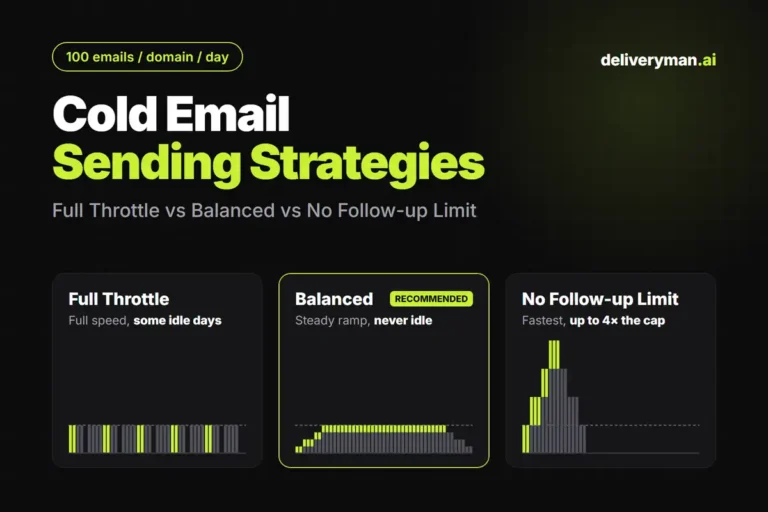
In a multi-step campaign, that budget has to cover two jobs: first emails to new leads, and follow-ups to the leads you have already contacted. Before a campaign goes live, the Review & Send screen asks you how to share it, through three sending strategies: Full Throttle, Balanced and No Follow-up Limit. This guide shows how each one schedules your emails, with a sample send schedule for each, plus the pros, cons and best use of every mode.
Why follow-ups make cold email scheduling hard
Every new lead you email today books more sends on future days. Email 1 goes out today, and each follow-up lands a set number of days later, whether or not the domain has room left that day.
Every chart in this guide uses the same sample campaign:
| Setting | Value |
|---|---|
| Contacts | 1,000 |
| Sending domains | 1, so the daily limit is 100 emails |
| Sequence | Email 1 plus 3 follow-ups |
| Follow-up gaps | 2 days, 3 days, then 2 days: each lead gets emails on day 1, 3, 6 and 8 of their journey |
Say you email 100 new leads on day 1 and another 100 on day 2. Day 3 already owes 100 follow-ups to the day 1 leads. Keep adding 100 new leads every day and day 8 would need 400 sends from one domain: a new batch plus three waves of follow-ups. Something has to give. You can leave some days without new leads, send fewer new leads every day, or let follow-ups go past the cap. Each sending strategy picks one of those.
The charts below are a simplified model of each mode. They ignore sending windows, skipped weekdays and replies that end a sequence early, so real campaigns run a little longer. Focus on the shape of each schedule rather than the exact day counts.
Full Throttle Mode: every domain at 100 a day, with some idle days
Full Throttle runs each domain at its full 100 emails a day whenever it can. It starts a new batch of leads only when that batch and all of its follow-ups will fit under the cap on every day they land. Follow-ups always go out on time. When a day’s follow-ups leave no room, and a new batch would collide with follow-ups later, the domain sends nothing that day.
In the sample, every day the domain sends hits exactly 100. Each lead gets email 1 in a two-day burst, then follow-ups fill the next week. Every nine days there is one idle day (days 5, 14, 23, 32 and 41) when the sequence leaves no slot for a new batch. The campaign finishes on day 45.
Full Throttle pros and cons
Pros
- Uses the full 100 emails per domain on every day it sends.
- Finishes faster than Balanced Mode.
- New sends never delay a follow-up.
- Never goes past 100 emails per domain per day.
Cons
- Daily volume jumps between 100 and zero.
- Much slower than No Follow-up Limit Mode.
Best for: campaigns where you want speed while staying strictly within the 100-per-domain cap, and you don’t mind a few quiet days.
Balanced Mode: a steady ramp up to your daily limit
Balanced splits each domain’s daily limit between new leads and follow-ups so that every day is used and no day goes over. It sends fewer new leads each day, which leaves room for the follow-ups they will create. Daily volume starts low, then climbs as follow-up waves stack up, until the domain settles at 100 a day.
In the sample, Balanced sends 25 new leads a day. The first five days carry only 25 to 50 emails. From day 8, when all four emails are in flight, the domain sends exactly 100 a day: 25 new leads and 75 follow-ups. It holds that level with no idle days until the last follow-ups taper off on day 47.
Balanced pros and cons
Pros
- Never goes past 100 emails per domain per day.
- Predictable, even daily volume with no idle days.
- Volume ramps up gradually instead of starting at full speed.
- New leads and follow-ups are planned together, so no day collides with the cap.
Cons
- Slower than No Follow-up Limit Mode, and in the sample two days slower than Full Throttle.
- Sends fewer emails in the first few days to keep the balance.
Best for: most campaigns. It is the recommended default and the safest choice for domain reputation.
No Follow-up Limit Mode: the only mode that goes past your daily limit
No Follow-up Limit is the one exception to your daily limit. The limit applies to new leads only, and follow-ups are sent on top of it. Every day can start a full batch of new leads up to the limit on each domain, no matter how many follow-ups are due.
In the sample, every contact gets email 1 within the first 10 days, and the campaign finishes on day 17, about four weeks ahead of the other two modes. The price is volume. From day 3 to day 15 the single domain sends more than 100 emails a day, and it peaks at 400 a day on days 8 to 10, when three follow-up waves overlap with a new batch.
No Follow-up Limit pros and cons
Pros
- Finishes significantly faster than either other mode.
- Every new lead gets their first email as early as possible.
Cons
- Follow-ups push each domain past its daily limit, up to four times the limit in a 4-email sequence.
- At higher volumes it can hurt your domain reputation over time.
Best for: small or time-sensitive campaigns, such as an event invite or a limited-time offer, sent from well-warmed domains. Spreading the campaign across more domains keeps each domain’s peak lower.
Sending strategies compared side by side
Full Throttle and Balanced both keep every domain at or under your daily limit, and they finish within two days of each other. No Follow-up Limit is the only mode that trades the cap for speed.
| Full Throttle | Balanced | No Follow-up Limit | |
|---|---|---|---|
| Finished (sample) | Day 45 | Day 47 | Day 17 |
| Most emails from one domain in a day | 100 | 100 | 400 |
| Days with no sends | 5 | 0 | 0 |
| Daily volume | 100 or zero | Ramps up to 100, then steady | Climbs to 4× the limit |
| Stays within your daily limit | Yes | Yes | New leads only |
| Speed | Fast | Medium | Fast |
| Risk | 🟢 Low | 🟢 Low | 🟠 Medium |
Which cold email sending strategy should you pick?
Start with Balanced Mode unless you have a clear reason not to. Then adjust from there:
- You want to finish sooner without ever going past your daily limit: pick Full Throttle, as long as you accept a few quiet days.
- You want steady, predictable volume and the lowest risk: pick Balanced. Every day is used and no domain goes over its limit.
- The campaign is time-sensitive and your domains are well warmed: pick No Follow-up Limit. Expect each domain to send several times its daily limit at the peak. Adding domains spreads that load.
Whichever mode you choose, a clean list matters just as much as a good schedule. Bounces hurt a domain faster than volume does, so check your email verification statuses before you launch.
How to choose a sending strategy in Deliveryman AI
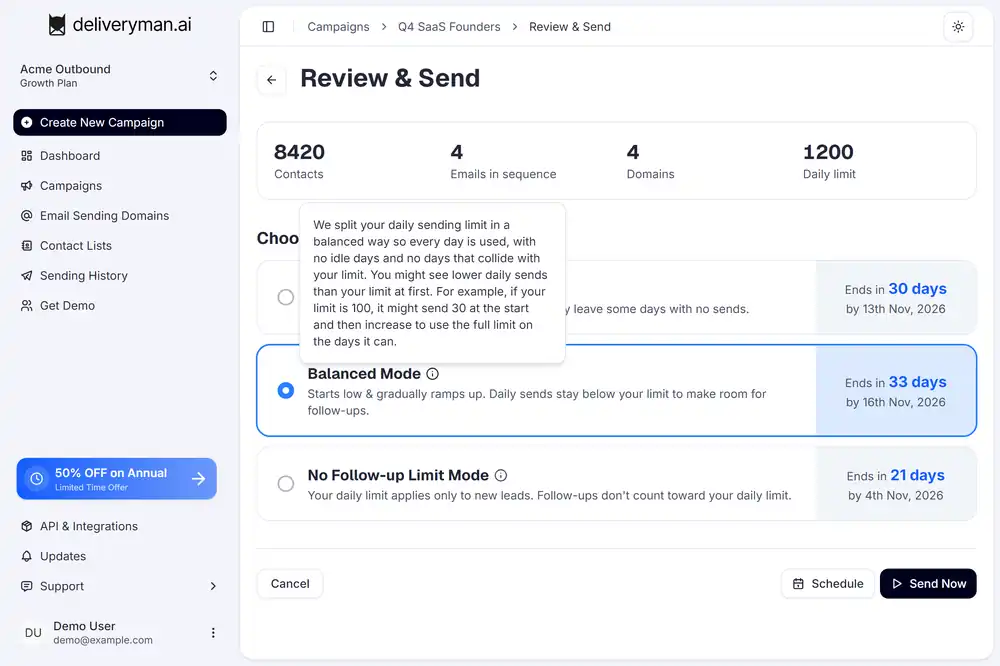
You’ll find the choice on the last step before launch. Open a campaign and go to the Review & Send screen. It lists the three strategies under Choose Sending Strategy, and each card shows an estimated finish date for your actual campaign, so you can compare before you commit.
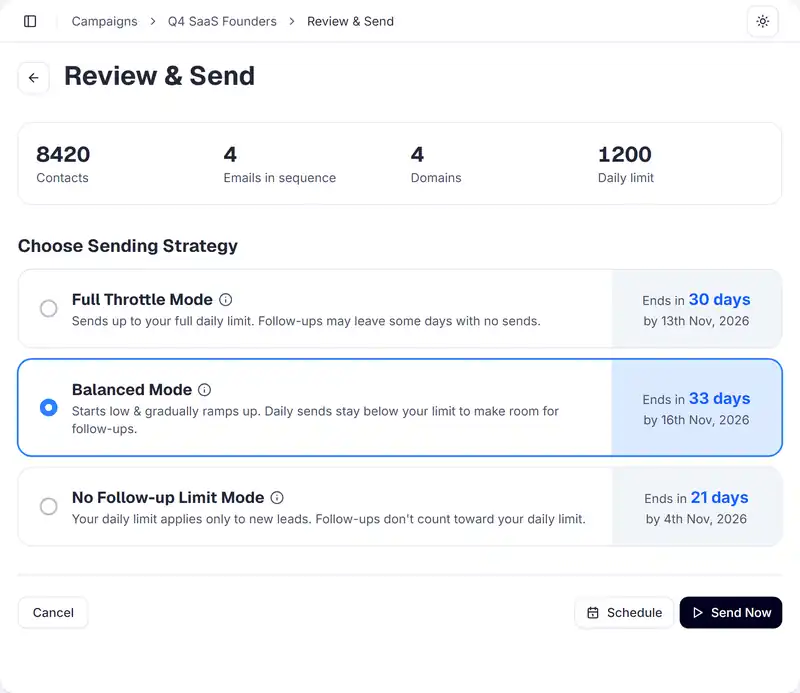
Hover the info icon next to a mode to read exactly how it schedules your emails. Then click Send Now to launch right away, or Schedule to pick a start date. Single-email campaigns skip this step, since there are no follow-ups to plan around.
Frequently asked questions
How many cold emails can one domain send per day?
On Deliveryman AI, you set the daily limit for each sending domain, up to a maximum of 100 emails per domain per day. The default is 25. Your campaign’s daily total is that limit times the number of domains connected to it. The only exception is No Follow-up Limit Mode, where follow-ups can go over the limit.
Do follow-up emails count toward my daily sending limit?
Yes, in Full Throttle and Balanced Mode. Every follow-up uses part of the domain’s daily limit for that day. In No Follow-up Limit Mode, only first emails to new leads count toward the limit.
Which sending strategy is safest for deliverability?
Balanced Mode. It ramps volume up gradually, sends every day without gaps and never goes past your daily limit.
What is the fastest way to finish a cold email campaign?
No Follow-up Limit Mode finishes fastest, because every day can start a full batch of new leads. In our sample it finished in 17 days instead of about 45. The trade-off is that daily volume per domain can reach several times the normal cap.
Deliveryman AI plans every campaign around your domains’ daily limits, so follow-ups never collide with new sends unless you choose speed over safety. Launch your next campaign with the right sending strategy →