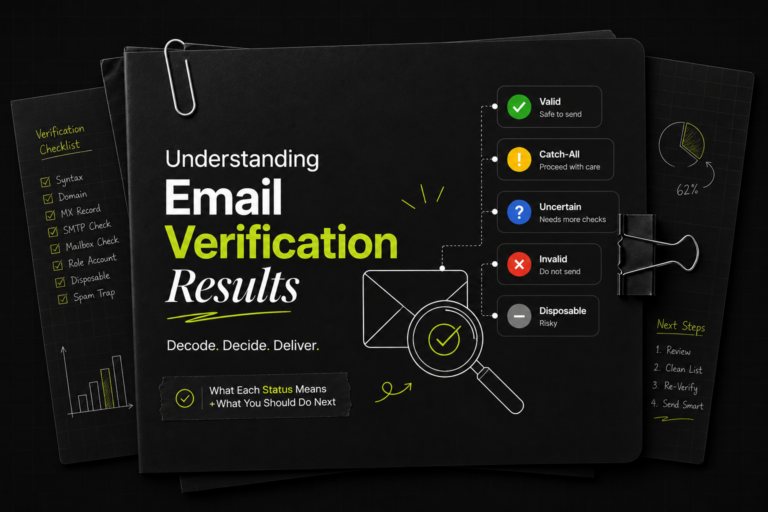

Every email you send is a small bet on your sender reputation.
Land in a real, active inbox and you earn a little more trust with mailbox providers. Hit a dead address, a spam trap, or a throwaway inbox and you chip away at the deliverability you’ve spent weeks warming up. The math is brutal: a single dirty list can bury an entire sending domain, and once a domain’s reputation tanks, even your good emails start landing in spam.
That’s the whole reason Deliveryman AI checks every contact before you send a single message and tags each one with an Email Verification Status. The status isn’t there to make your list look smaller; it’s there to tell you, contact by contact, whether sending is safe, risky, or a guaranteed bounce.
This guide breaks down every status you’ll see, why it shows up, and the action to take. Read it once and you’ll never have to guess what a label means again.
How email verification works (the 30-second version)
When you upload a contact list, each address runs through a series of checks: Is it formatted correctly? Is it a disposable address? Is it flagged as dangerous? Does the mailbox actually exist? Is the inbox accepting mail right now?
Those checks run in a strict order of priority, and the first serious problem wins. That’s important, so it’s worth saying twice: a contact only ever shows one verification status, even if it trips more than one check. If an address is both disposable and on a catch-all domain, you’ll only see the higher-priority result. (More on why at the end.)
The summary cards at the top of your contact list: Total Contacts, Invalid Emails, Catch All, Inbox Full, and so on are simply a tally of these statuses. Total Deliverable is the number you actually care about: the contacts cleared to send.
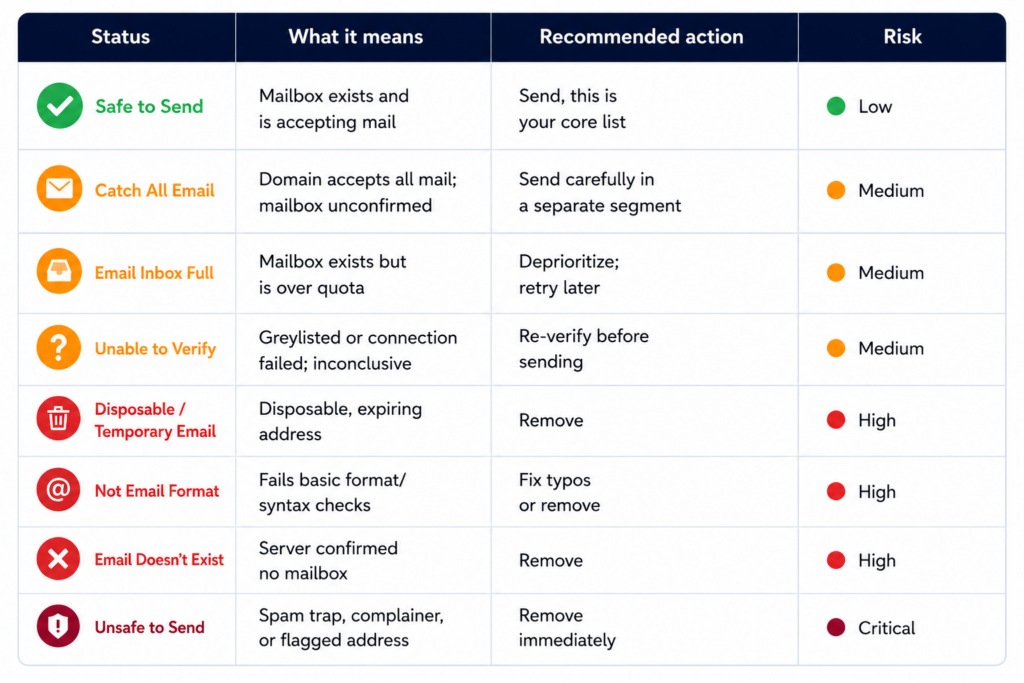
Here’s what each status means.
Safe to Send
This is your green light. The mailbox exists, the server confirmed it, and it’s currently accepting mail. These are real people at reachable addresses.
Every contact marked Safe to Send rolls up into your Total Deliverable count. This is the segment you build campaigns around.
What to do: Send. This is exactly what you verified the list for.
Catch All Email
A catch-all domain is configured to accept mail sent to any address at that domain, whether the specific mailbox exists or not. The receiving server says “yes” to everything, which means we can confirm the domain is live but can’t confirm the individual mailbox is real.
This is the gray zone of email verification, and it trips up a lot of senders. A catch-all result is neither a clean pass nor a fail. Plenty of these are genuine people. Catch-all setups are common at smaller companies and agencies that simply don’t want misaddressed mail to bounce. But some are dead ends.
What to do: Send carefully, not blindly. Treat catch-all contacts as a separate, lower-volume segment, watch your bounce rate closely, and ease into them rather than blasting the whole batch at once. They’re worth pursuing, but just not at the same confidence level as Safe to Send.
Email Doesn’t Exist
The mail server checked and explicitly came back with: there is no mailbox at this address. This is a guaranteed hard bounce if you send to it.
What to do: Remove it. There’s no upside and real downside. Every hard bounce is a direct hit to your sender reputation. This is one of the most important contacts to keep out of your campaign.
Email Inbox Full
The mailbox exists, but it’s over quota and can’t take new mail right now. Send to it today and your message likely bounces back as a temporary (soft) failure until they clear space.
There’s also a quieter signal here: a chronically full inbox often points to an abandoned or rarely-checked account. The person may technically be reachable, but they may not be opening their mailbox.
What to do: Deprioritize. You can keep these for a later retry, but don’t lead with them and don’t count on engagement even if the message eventually lands.
Temporary Email
This is a disposable, throwaway address, the kind people spin up from services like 10-minute-mail providers to grab a free download or trial without handing over a real inbox. These addresses expire, often within minutes or hours.
A temporary email tells you something about intent: this person didn’t want to be contacted. Even if the address still works for a moment, the human behind it isn’t reachable in any durable way.
What to do: Remove. Low intent, no real conversion path, and a future source of bounces. There’s nothing to salvage here.
Unsafe to Send
This is the one you never gamble on. A “dangerous” flag means the address is associated with serious deliverability risk. Think spam traps, honeypot addresses, known complainers, or accounts with a history of marking mail as spam.
Spam traps in particular exist specifically to catch senders with poor list hygiene. Hitting even one can get your domain quietly throttled or blacklisted, and you often won’t know until your inbox rates have already collapsed.
What to do: Remove immediately, no exceptions. The single fastest way to wreck a sending domain is to mail an address like this. The cost of skipping it is zero. The cost of sending to it can be your entire program.
Not Email Format
The address failed a basic structure check, either a missing @, an invalid character, a malformed domain, or a typo like a missing .com. If the format is broken, there’s nothing further to verify, so every other field stays blank.
What to do: Scan for obvious, fixable typos (a misspelled gmial.com, a dropped domain extension) and correct them so they can be re-verified. Anything that can’t be salvaged should come off the list. A malformed address bounces the instant you send.
Unable to Verify
Sometimes we genuinely can’t get a definitive answer. The receiving server may be “greylisting” a common anti-spam tactic where the server temporarily defers unknown senders or it may have timed out or refused the connection during the check.
The key thing to understand: this is inconclusive, not bad. The address could be perfectly real. We just couldn’t confirm it in that moment.
What to do: Re-verify later. Greylisting almost always resolves on a retry, and a temporary connection issue usually clears on its own. If you need to act before then, treat these as cautious sends in small batches, close monitoring is required rather than confirmed-good contacts.
Why a contact only shows one status
If you’ve ever wondered why an address that looks like it could fail two checks only displays a single result, here’s the logic. Verification runs as a waterfall, top to bottom, and stops at the first meaningful verdict:
- Is it a valid format? If not → Not Email Format (nothing else is checked)
- Is it disposable? If yes → Temporary Email
- Is it dangerous? If yes → Unsafe to Send
- Can we even reach the server? If it’s greylisted or errors out → Unable to Verify
- Is it a catch-all domain? If yes → Catch All Email
- Does the mailbox exist? If no → Email Doesn’t Exist; if yes → Safe to Send (or Email Inbox Full if it’s over quota)
The earlier a problem appears in that list, the more decisive it is, so it takes priority and the remaining fields are left blank. This is by design: it surfaces the most important reason not to send first, instead of burying it under lower-priority details.
Quick reference for Email Verification Statuses
| Status | What it means | Recommended action | Risk |
|---|---|---|---|
| Safe to Send | Mailbox exists and is accepting mail | Send, this is your core list | 🟢 Low |
| Catch All Email | Domain accepts all mail; mailbox unconfirmed | Send carefully in a separate segment | 🟠 Medium |
| Email Inbox Full | Mailbox exists but is over quota | Deprioritize; retry later | 🟠 Medium |
| Unable to Verify | Greylisted or connection failed; inconclusive | Re-verify before sending | 🟠 Medium |
| Disposable / Temporary Email | Disposable, expiring address | Remove | 🔴 High |
| Not Email Format | Fails basic format/syntax checks | Fix typos or remove | 🔴 High |
| Email Doesn’t Exist | Server confirmed no mailbox | Remove | 🔴 High |
| Unsafe to Send | Spam trap, complainer, or flagged address | Remove immediately | 🔴 Critical |
Clean before you send, and every email after that works harder for you. That’s the whole point.
Deliveryman.ai verifies every contact in your list automatically from format, disposable, dangerous, catch-all, and mailbox existence so you know exactly who’s safe to reach before you hit send. Start verifying your contact list →