Answer every reply.
Even when you're away.
Write a response once for positive, neutral and negative replies. Deliveryman sends it in the same thread, after a wait you choose.
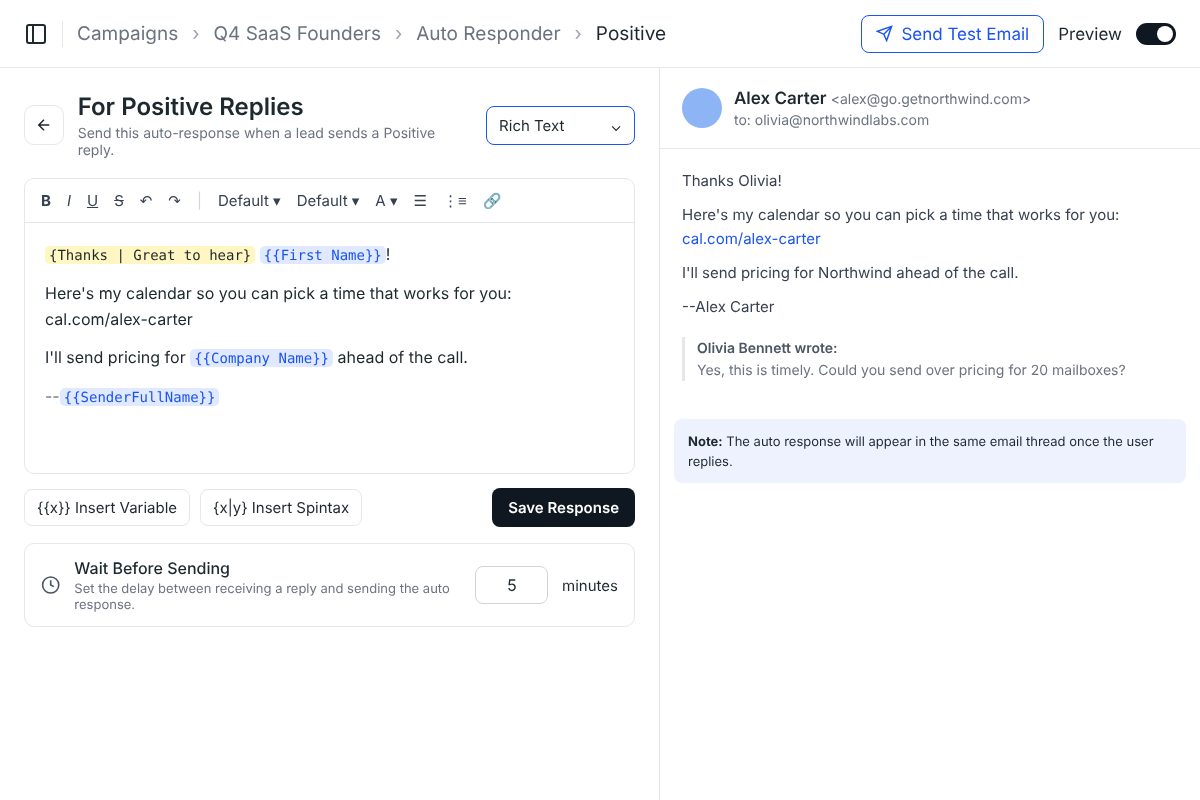
What's an auto responder?
An auto responder answers a reply for you with a message you wrote in advance. The lead gets a quick, helpful answer, and you pick up the conversation when you're ready.
Reply while they're keen
Interested leads hear back in minutes, while they're still thinking about you.
The right reply, every time
Booking link, pricing, next steps. Written once, sent the same way to everyone.
Answers around the clock
Replies that arrive at night, at weekends or in other time zones still get a response.
One response for each
kind of reply.
Every reply is sorted as Positive, Neutral or Negative. Write a response for each one, or only the ones you need.
- Positive replies
Interest, a pricing question, a demo request.
Your auto response
Thanks, {{First Name}}! Here's my calendar so you can pick a time that suits you: cal.com/alex-carter Best regards, Alex Carter
Share a booking link or the next step.
- Neutral replies
Unclear replies, most often out-of-office messages.
Your auto response
Hi {{First Name}}, No problem, I'll check back once you're back at your desk. Best regards, Alex Carter
Keep the door open without pushing.
- Negative replies
“Not interested”, “stop emailing me”, or worse.
Your auto response
Understood, {{First Name}}. You won't hear from us again. Thanks for letting me know. Best regards, Alex Carter
Close politely. The contact is unsubscribed too.
Fast, but not instant.
A response that arrives seconds after a reply looks automated. Set a wait in minutes, and the response goes out when a person could have written it.
Each reply type has its own wait, so you can answer an interested lead quickly and give an out-of-office a little longer.
Re: Quick question about Northwind's outbound
- OB
Olivia Bennett10:42 am
Hi Alex, Yes, this is timely. Could you send over some times to chat? Thanks, Olivia Bennett
Wait before sending: 5 minutes
- AC
Alex Carter · Auto response10:47 am
Thanks, Olivia! Here's my calendar so you can pick a time that suits you: cal.com/alex-carter Best regards, Alex Carter
Written like any other email.
Sent like you wrote it.
Variables & spintax
Insert {{First Name}}, {{Company Name}} or any field, and vary the wording with spintax.
Live preview
See exactly how the response will read for a real contact before you save it.
Send a test email
Send the response to yourself first and check it in your own inbox.
Same thread
The response lands in the same email thread as the lead's reply, not as a new email.
Set it up once.
Every reply is covered.
- 1
Open the Auto Responder tab
Every campaign has one, next to Email Sequences and Replies.
- 2
Pick a reply type
Click Setup next to Positive, Neutral or Negative replies. Set up one, two or all three.
- 3
Write the response
Use the editor with variables and spintax, then send yourself a test email.
- 4
Set the wait and save
Choose how many minutes to wait after a reply before the response goes out.
Why an auto responder beats answering every reply by hand
Replies come in at every hour, and the first answer matters most. The Auto Responder makes sure every lead hears back, even when nobody is at the inbox.
 Deliveryman
Related features
All features → Never leave a reply waiting.
The Auto Responder comes with every Deliveryman campaign, alongside the Master Inbox, reply sorting and unlimited mailboxes.
Frequently Asked Questions
What is the Auto Responder?
It sends a response you've written in advance when a lead replies to your campaign. You can write a different response for Positive, Neutral and Negative replies.
Is it set up per campaign?
Yes. Every campaign has its own Auto Responder tab, so each campaign can answer replies in its own words.
When is the response sent?
After the wait you set in Wait Before Sending, counted in minutes from when the reply arrives. A short wait keeps the response from looking instant and automated.
Can I personalise the response?
Yes. Insert variables like {{First Name}} or {{Company Name}}, and add spintax so not every response reads the same.
Where does the response appear?
In the same email thread as the lead's reply, so the conversation stays together in their inbox and in your Master Inbox.
Do follow-ups still go out after someone replies?
No. Any reply stops the sequence for that contact. If you've set up an auto response for that reply type, that's the only email they get automatically.