Follow up with every lead.
Take over when they reply.
Build multi-step sequences with personalised follow-ups and a wait between each step. When a contact replies, follow-ups stop and your auto responder can answer for you.
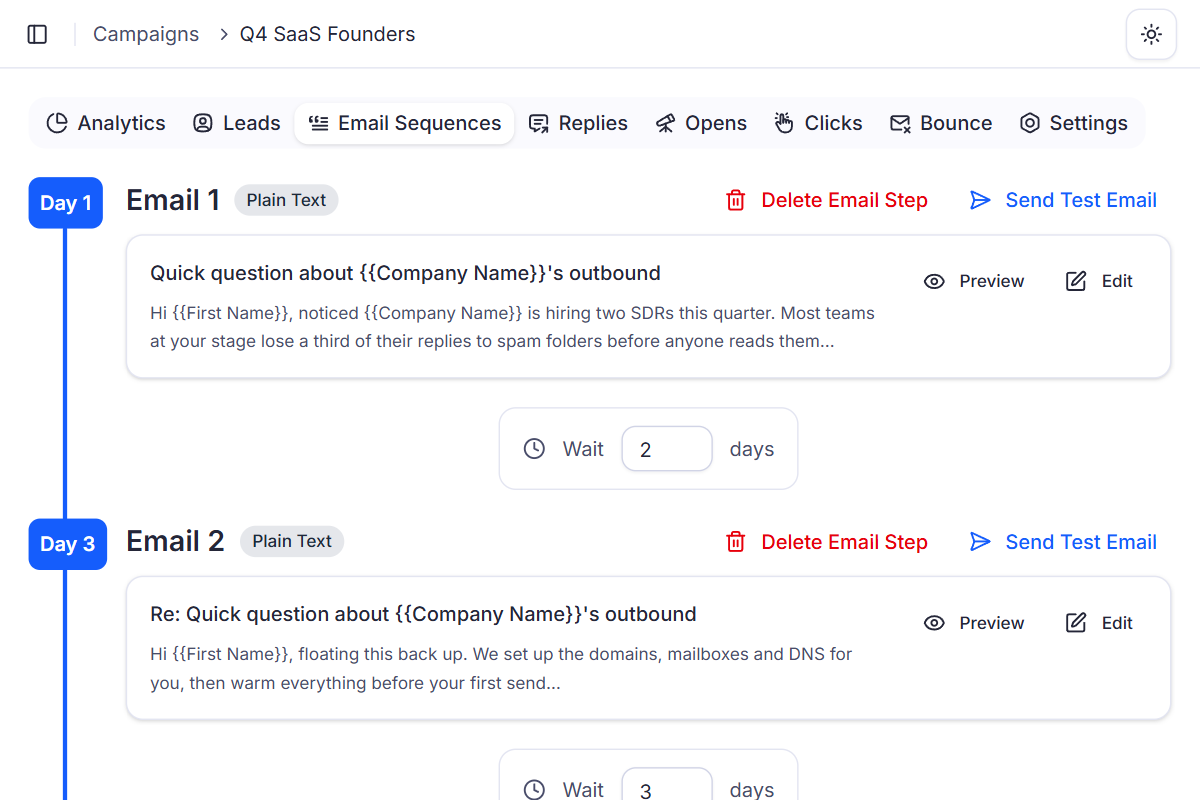
Set the steps once. Every contact moves on their own.
Each email waits the number of days you choose. Contacts who reply drop out, and everyone else gets the next step.
Q4 SaaS Founders
4 emails in sequence
- Day 1First email
Email 1
Quick question about {{Company Name}}'s outbound
Hi {{First Name}}, noticed {{Company Name}} is hiring two SDRs this quarter…
- Day 3Wait 2 days
Email 2
Re: Quick question about {{Company Name}}'s outbound
Hi {{First Name}}, floating this back up. We set up the domains, mailboxes and DNS for you…
- Day 6Wait 3 days
Email 3
Re: Quick question about {{Company Name}}'s outbound
Hi {{First Name}}, would a short walkthrough on {{NextWorkingDate}} help?
- Day 10Wait 4 days
Email 4
Re: Quick question about {{Company Name}}'s outbound
Hi {{First Name}}, I'll close the loop here. If outbound becomes a priority, just reply.
Three contacts, one sequence
Any reply stops the follow-ups. A negative one also unsubscribes.
| Contact | Email 1 | Email 2 | Email 3 | Email 4 | Then |
|---|---|---|---|---|---|
| olivia@northwindlabs.com“Sure, Thursday works.” | Sent | Positive | Not sent | Not sent | Auto response, if set |
| marcus@brightpixel.io“Can you send pricing first?” | Sent | Sent | Neutral | Not sent | Auto response, if set |
| priya@lumenhealth.co“Not interested, please remove me.” | Negative | Not sent | Not sent | Not sent | Unsubscribed |
Personal at scale,
without writing every email.
Write one template with tags. Every contact gets an email that reads like it was written for them.
You write once
{Quick | Short} question about {{Company Name}}'s outbound
{Hi | Hello | Hey} {{First Name:fallback"there"}}, noticed {{Company Name}} is hiring two SDRs this quarter. Worth a quick call on {{NextWorkingDate}}?
Variables
Any field you mapped on import.
Fallbacks
Used when a contact's field is empty.
System tags
{{SenderFirstName}}, {{CurrentMonth}}, {{DaysLeftInMonth}} and more.
Spintax
One option picked per email, so no two read the same.
Each contact receives
To: olivia@northwindlabs.com
Quick question about Northwind's outbound
Hi Olivia, noticed Northwind is hiring two SDRs this quarter. Worth a quick call on Monday?
To: marcus@brightpixel.io
Short question about BrightPixel's outbound
Hey Marcus, noticed BrightPixel is hiring two SDRs this quarter. Worth a quick call on Monday?
To: sales@contosoltd.com
Quick question about Contoso's outbound
Hello there, noticed Contoso is hiring two SDRs this quarter. Worth a quick call on Monday?
Your format
Write each step in Plain Text, Rich Text or HTML.
A/Z variations
Give any step several versions. Each contact sees one for the whole sequence.
See A/Z testingChecked as you write
A content check score updates while you type, so you can fix spam triggers early.
See the content spam checkSend a test email from any step before the campaign goes live.
Follow-ups stop.
Replies get answered.
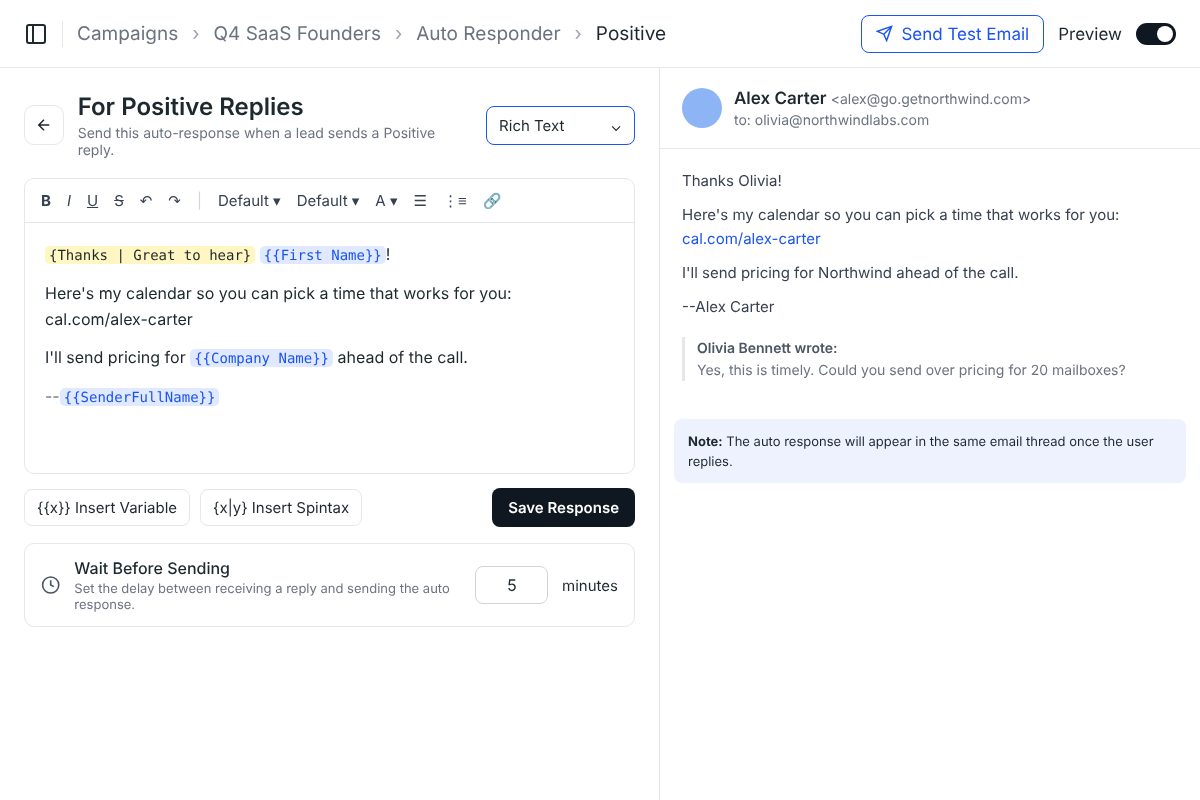
When a contact replies, their follow-ups stop. Answer them yourself from the Master Inbox, or let the Auto Responder reply with a response you wrote for Positive, Neutral or Negative replies.
- Set it per campaign, with a response for each reply type
- Personalise it with the same variables and spintax as your steps
- Choose how many minutes to wait before it's sent
- Sent in the same thread, so it reads like you answered
Why built-in sequences beat manual follow-ups
Keeping track of who got which follow-up, and who already answered, falls apart fast by hand. In Deliveryman, every step goes out on time and stops when it should.
 Deliveryman
Related features
All features → Write the sequence once.
Unlimited sequences and follow-ups come with every Deliveryman plan, alongside mailboxes, warmup and a master inbox for every reply.
Frequently Asked Questions
How many follow-ups can a sequence have?
As many as you want. Add an email step for each follow-up and set a wait, in days, before it goes out. Sequences are unlimited on every plan.
What happens when someone replies?
When a contact replies, the sequence stops for them automatically, whatever the reply says, so they never get a follow-up after answering. Other contacts in the campaign carry on as planned.
Can I write in HTML?
Yes. Each step can be written in Plain Text, Rich Text or HTML. Note that open tracking needs Rich Text or HTML, since plain-text emails can't track opens.
How does personalisation work?
Use variables from your contact fields like {{First Name}} or {{Company Name}}, add a fallback for empty fields, insert system tags like {{SenderFirstName}} or {{NextWorkingDate}}, and use spintax like {Hi | Hello | Hey} to vary the wording.
Can I test different versions of a step?
Yes. Any step can have A/Z variations with different subject lines or content. Contacts are split randomly, each one gets a single variation for the whole sequence, and you see open, reply and click rates for each.
Do follow-ups count toward my plan?
Yes. Every email sent counts as one usage, follow-ups included. Warmup emails and uploading leads don't count.