Know the day you're listed.
Know how to get off.
Every domain is checked against 80+ public blacklists every day. If one is listed, you get an alert with a step-by-step removal guide.
What's an email blacklist?
A blacklist is a public list of domains and IP addresses reported for sending spam. Mailbox providers check these lists when your email arrives, and a listing can decide where it ends up.
Lookup · getnorthwind.com
- Spamhaus DBL · DomainClean
- Barracuda · IPListed
- SURBL · DomainClean
- SpamCop · IPClean
Public lists of spam senders
Some lists flag sending domains, others flag the IP addresses mail comes from. Either can hurt delivery.


 Provider checks the lists
Checked on every email
Gmail, Outlook and Yahoo look you up as your email arrives, then decide where it goes.
Mail Delivery Subsystem
Delivery Status Notification (Failure)
554 Service unavailable; Client host [203.0.113.24] blocked using b.barracudacentral.org
Your email to priya@lumenhealth.co wasn't delivered.
What a listing costs
Every mailbox on the domain starts bouncing or landing in spam, and trust is slow to win back.
How domains end up on a blacklist.
Listings rarely come out of nowhere. Almost all of them trace back to one of four habits, and each one can be avoided.
Hitting spam traps
Blacklists run addresses that exist only to catch bad senders. Some were never real people, others are old inboxes turned into traps. Emailing one shows you're mailing a list you didn't build carefully.
How to stay off
Verify every list before it's sent, so invalid and risky addresses are held back.
Email verificationHigh bounce rates
Lots of emails to addresses that don't exist is a classic sign of a bought or scraped list. Providers notice, and lists can flag the sending domain or IP.
How to stay off
Verify contacts first, and let campaigns cancel themselves when bounces climb.
Campaign protectionSpam complaints
Every “Report spam” click counts against you. Even a small share of complaints hurts reputation, and reports can feed straight into blacklists.
How to stay off
Write relevant emails, catch spam triggers as you write, and unsubscribe anyone who says no.
Content spam checkSudden volume spikes
A new domain that suddenly sends thousands of emails looks like a spammer. Providers expect sending to grow gradually as trust builds.
Do all four and listings become rare. Daily monitoring tells you if one happens anyway.
Not every listing is an emergency.
Some blacklists can stop your emails reaching the inbox. Others are mostly ignored. Deliveryman reacts to each one differently.
Campaigns pause
Lists with a very high or severe impact on deliverability.
Q4 SaaS Founders
Pausedgetnorthwind.com listed on Barracuda Reputation Block List
- Campaigns using the domain pause automatically
- Urgent email alert with a removal guide
- Resume once the domain is delisted
Campaigns keep sending
Lists that major email providers typically ignore.
Q4 SaaS Founders
Runninggetnorthwind.com listed on UCEProtect Level 1
- Campaigns keep running
- Email alert with a removal guide
Checked every day.
Fixed with a guide.
- 1
Every domain is scanned daily
Each sending domain is checked against 80+ public blacklists, including real-time reputation networks.
- 2
A listing is found
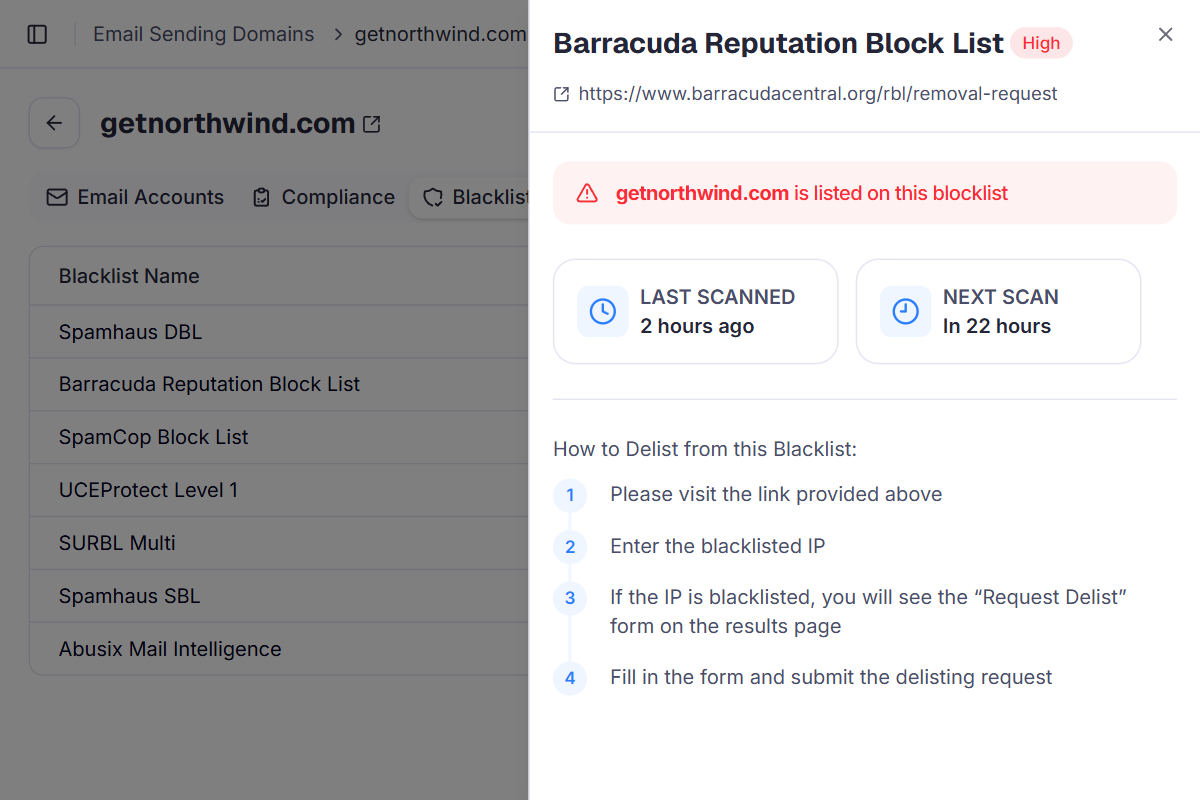
The domain's Blacklist tab shows which list, how severe it is and a status indicator.
- 3
You get an alert and a guide
An email arrives right away with the blacklist name, severity and step-by-step removal instructions.
- 4
Back to Healthy
Once you're delisted, the next clean scan restores the Healthy status automatically.
getnorthwind.com · Blacklist
Scanned 2 hours ago · Next scan in 22 hours- Spamhaus DBLNot listed
- Barracuda Reputation Block ListListed · High
- SpamCop Block ListNot listed
- UCEProtect Level 1Not listed
- SURBL MultiNot listed
- Spamhaus SBLNot listed
- Abusix Mail IntelligenceNot listed
Why daily monitoring beats checking blacklists by hand
Manual blacklist lookups are easy to forget and slow across many domains. In Deliveryman, every domain is checked every day and you hear about a listing the moment it happens.
 Deliveryman
Related features
All features → Catch a listing before it costs you replies.
Daily blacklist monitoring comes with every Deliveryman plan, alongside unlimited domains, warmup and campaign protection.
Frequently Asked Questions
Which blacklists do you check?
Every domain is checked against 80+ public blacklists, including real-time reputation networks such as Spamhaus, Barracuda, SpamCop, UCEProtect, SURBL and Abusix.
How often are my domains scanned?
Every day, automatically, for every domain you connect. Your domains page shows when each one was last scanned and when the next scan is due.
What happens if my domain gets listed?
You get an email alert straight away with the blacklist name, its severity and a step-by-step removal guide. The dashboard shows the same details on the domain's Blacklist tab.
Will my campaigns stop?
Only for high-severity listings. Running campaigns that use the domain are paused automatically and you get an urgent alert. Moderate-severity lists are typically ignored by major email providers, so campaigns keep running and you still get an alert.
How do I get my domain delisted?
Follow the removal guide for that blacklist, which links to its removal page. Once you're delisted, the next clean scan restores the Healthy status automatically and you can resume any paused campaigns.
Does blacklist monitoring cost extra?
No. It's included on every plan and runs for every domain you connect, with no limit.