Risky addresses blocked.
Unsubscribes respected.
A Global Blocklist shared across Deliveryman stops known bad addresses, and your own blocklist makes sure anyone who opted out is never emailed again.
Two blocklists, one job.
One protects everyone on Deliveryman. The other remembers every person who told you no. Both are checked before any email goes out.
Global Blocklist
Shared across every Deliveryman account.
- Addresses with a history of spam complaints
- Addresses that hard-bounce again and again
- Spam traps
- Invalid or unsafe addresses
- Known high-risk or abusive domains
Blocked automatically. They can't be emailed, even if they're in your list.
Workspace Blocklist
Yours, applied to every campaign in the workspace.
- Contacts who unsubscribed
- “Not interested” and “stop emailing” replies
- Bounced addresses
- Any address you add yourself
Never emailed again, even if the same address is uploaded in a new list.
Upload the same list twice. Opt-outs stay out.
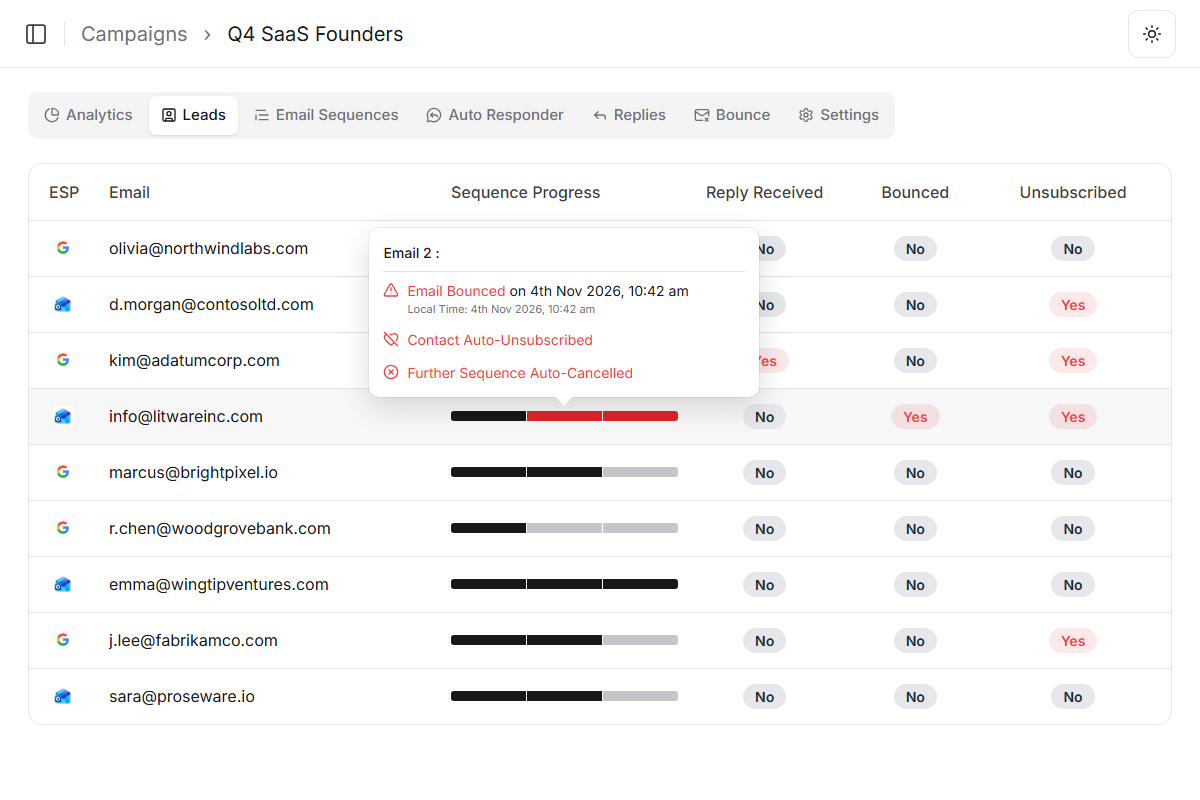
Lists get exported, merged and re-uploaded all the time. Deliveryman checks every contact against both blocklists before a campaign sends, so someone who unsubscribed in one campaign never hears from you in the next.
Q4 SaaS Founders
Blocklist check- olivia@northwindlabs.comWill be emailed
- d.morgan@contosoltd.comUnsubscribed
- marcus@brightpixel.ioWill be emailed
- kim@adatumcorp.comNegative Reply
- info@litwareinc.comBounced
- admin@tailspintoys.netGlobal Blocklist
- emma@wingtipventures.comWill be emailed
Every way out of your list,
handled for you.
One-click unsubscribe
Every email carries a One-Click Unsubscribe header (RFC 8058), in line with CAN-SPAM and GDPR.
Unsubscribe line
Add an optional unsubscribe line to your emails. Deliveryman varies the wording, or you write your own.
Bounces
Bounced addresses are removed from future sends, so you don't keep hitting dead mailboxes.
Imported unsubscribes
Bringing a list from another tool? Map an unsubscribe column (Yes or True) and those contacts are skipped.
Whichever way they leave, they're never emailed again
Every campaign in the workspace skips them from then on, even if they're uploaded again.
- Unsubscribed
- Bounced
- Skipped on import
Why built-in blocklists beat a suppression spreadsheet
A suppression list kept by hand is only as good as the last time someone updated it. In Deliveryman, blocklists update themselves and apply to every send.
 Deliveryman
Related features
All features →- Unlimited Email VerificationEvery uploaded contact checked before it reaches a campaign.Learn more →
- Automatic Campaign ProtectionCampaigns paused or cancelled when something goes wrong.Learn more →
- Master Inbox & Reply SortingEvery reply in one inbox, sorted Positive, Neutral or Negative.Learn more →
 Never email the wrong person twice.
Global and workspace blocklists come with every Deliveryman plan, with no limit on entries.
Frequently Asked Questions
What is the Global Blocklist?
A blocklist shared across every Deliveryman account. It holds addresses and domains with a history of spam complaints, consistent hard bounces, spam traps, invalid or unsafe addresses and known high-risk domains. They're blocked automatically and can't be emailed, even if they're in your list.
What goes on my workspace blocklist?
Contacts who unsubscribe, contacts who reply with things like “not interested” or “stop emailing me”, bounced addresses, and any address you add yourself. They're never emailed again by any campaign in that workspace.
If I upload a contact who already unsubscribed, will they be emailed?
No. The workspace blocklist applies to every campaign in the workspace, so re-uploading the same address doesn't put it back into your sends.
Can I add or remove addresses myself?
Yes. Use Add Emails on the Blocklists page to block any address, and remove an entry from your workspace blocklist if it was added by mistake.
Are my emails compliant with unsubscribe rules?
Every email includes a One-Click Unsubscribe header (RFC 8058), which supports CAN-SPAM and GDPR requirements. You can also add a visible unsubscribe line, written by you or varied automatically.
I run campaigns for several clients. Do they share a blocklist?
No. Each workspace has its own blocklist, so one client's unsubscribes never affect another's campaigns. The Global Blocklist protects every workspace.