Know who's interested.
Follow up while they are.
Deliveryman flags the leads opening your emails again and again, so you can send them a personal follow-up before the next step.
What makes a lead
High Intent?
Opens tell you who's paying attention. Deliveryman flags a lead when their opens show real interest, in one of two ways.
- Signal 1
Opens the same email again and again
They come back to your email more than once, a sign it's on their mind.
- Signal 2
Opens more than one email in your sequence
They read your first email and your follow-up, so they're following along.
One click to see
who's keen.
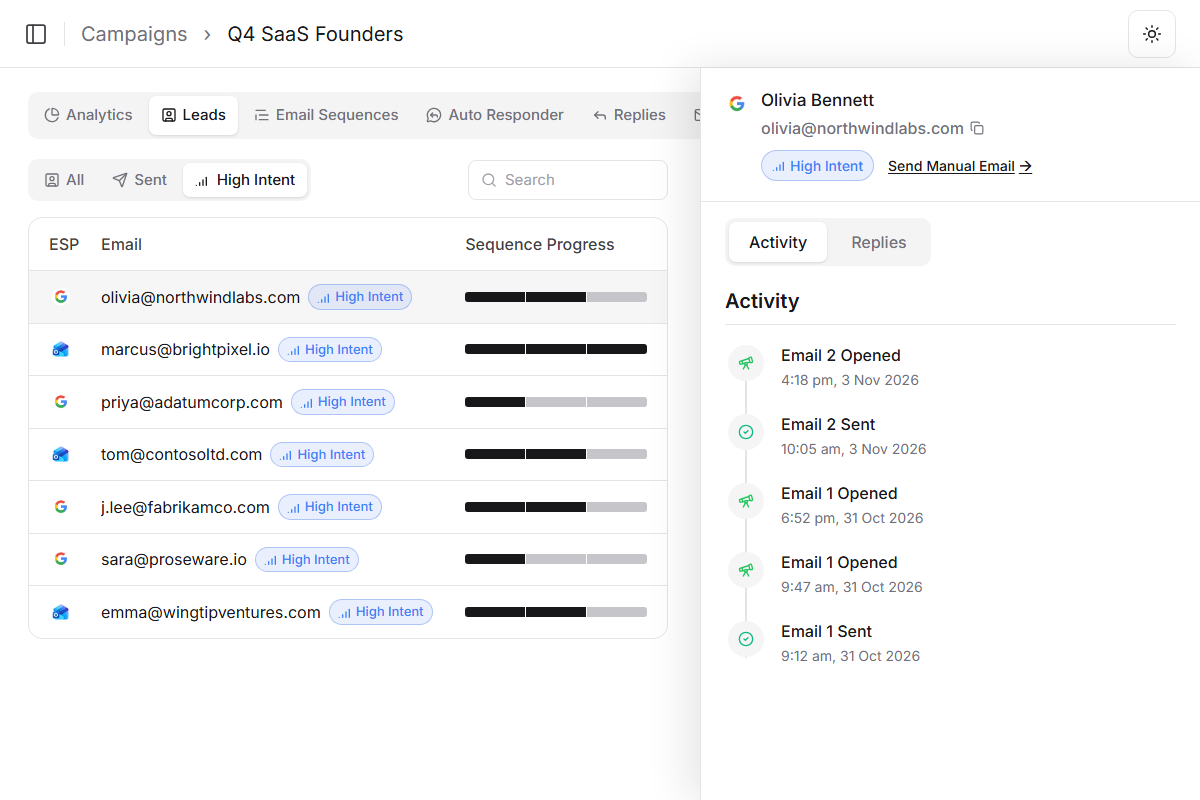
Every High Intent lead gets a badge in the campaign's Leads table. Switch on the High Intent filter, and the list shows only them.
Focus on the people most likely to reply, instead of scrolling through everyone the campaign has emailed.
What it needs
High Intent works from opens, so it runs on campaigns with open tracking.
Open tracking on
High Intent is based on opens, so the campaign needs open tracking.
Rich Text or HTML emails
Opens can be tracked on Rich Text and HTML emails, not plain text.
Reply before
it goes cold.
Interest doesn't last. Write while a lead keeps opening your emails, before they move on.
Reply now
A personal note while they're interested
Don't respond
The lead moves on
Why a personal follow-up beats waiting for the next step
A sequence treats every lead the same. High Intent shows you who's already interested, so you can reach out while it counts.
 Deliveryman
Related features
All features → Reach out while they're interested.
High Intent Leads works with every Rich Text or HTML campaign that has open tracking, alongside the Master Inbox, reply sorting and trusted open tracking.
Frequently Asked Questions
What is a High Intent lead?
A lead who's shown high engagement with your campaign. Deliveryman flags them so you can reach out personally while they're interested.
How does Deliveryman decide a lead is High Intent?
A lead is flagged when they open your emails multiple times, or open more than one email in your sequence.
Where do I see High Intent leads?
In the campaign's Leads tab. Flagged leads show a High Intent badge next to their email, and the High Intent filter shows only those leads.
How do I follow up with one?
Click the lead to open the side drawer, then click Send Manual Email. It opens the Master Inbox, where you can pick the sender, add CC recipients and include your signature.
Does it work with plain text emails?
No. High Intent Leads needs open tracking turned on, which works on Rich Text and HTML emails. It isn't available for plain text campaigns.