One domain.
A reputation per provider.
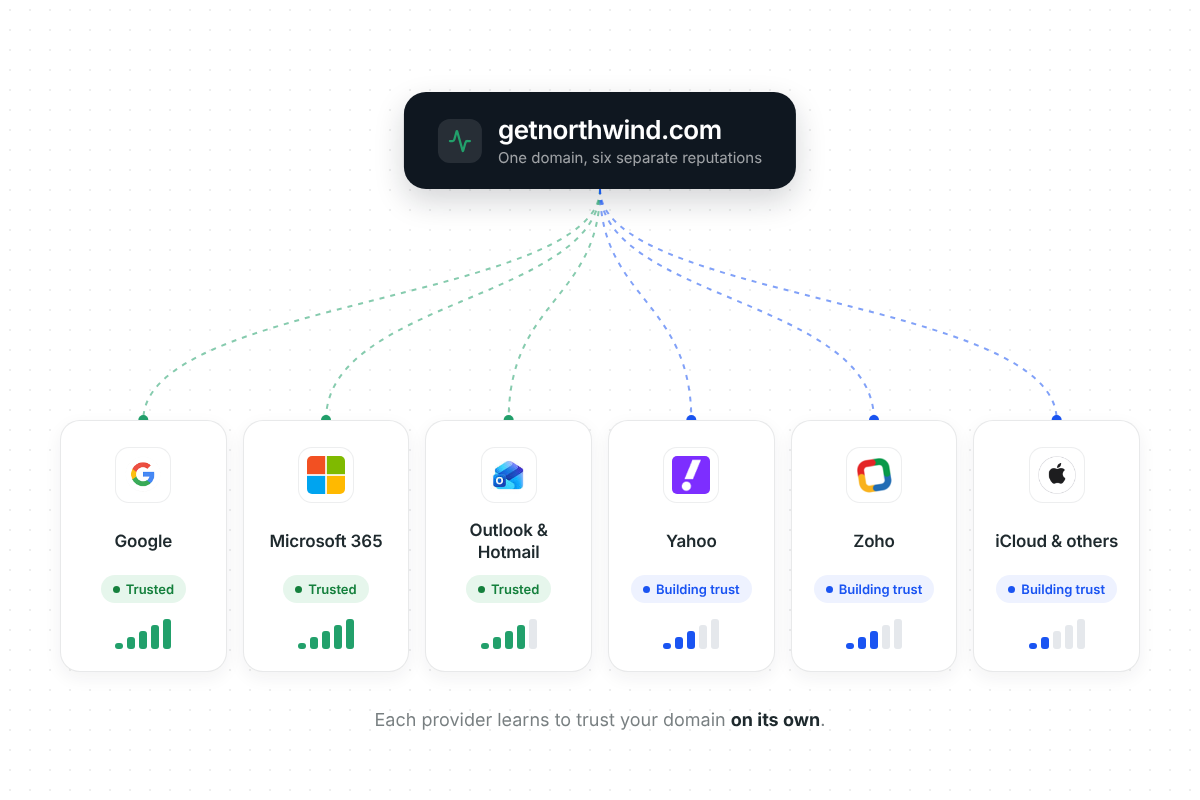
Gmail, Microsoft, Outlook, Yahoo and Zoho play by different rules, so Deliveryman builds your reputation separately with each.
What's sender reputation?
Every email provider keeps a score of how much it trusts your domain. A good score means the inbox. A poor one means spam, or not being delivered at all.
Key terms
- ESP
- The email service provider behind your prospect's inbox, like Gmail, Microsoft 365 or Yahoo.
- Sender reputation
- How much a provider trusts your domain, based on how its users react to your emails.
- Inbox placement
- The share of your emails that land in the inbox rather than spam.
What builds it
- Opens and replies from real people
- Emails moved out of spam
- Steady, gradual sending volume
- SPF, DKIM & DMARC in place
What hurts it
- Spam complaints
- Bounces from bad addresses
- Sudden jumps in volume
- Blacklist listings


Each provider only sees the emails sent to its own users. So Gmail, Microsoft and Yahoo each form their own opinion of your domain, and each one has to be earned separately.
A separate reputation with every inbox.
A domain can be trusted by Gmail and still be new to Yahoo, so Deliveryman builds your reputation with each provider on its own.
The same 14-day path, built separately for each provider
- Google
Reputation built for Gmail and Google Workspace on its own.
- Microsoft 365
Built for Microsoft's own filtering rules.
- Outlook & Hotmail
Treated as its own provider, separate from Microsoft 365.
- Yahoo
Trust built with Yahoo separately from the rest.
- Zoho
Its own reputation, not borrowed from bigger providers.
 iCloud, AOL & others
Smaller inboxes get their own reputation too.
Built for the inbox
your prospects actually use.
99%+
inbox placement on Microsoft 365
Reputation built for Microsoft's own rules pays off. Our Microsoft 365 setups are seeing 99%+ inbox placement.
Choose which ESPs you send to
If one provider starts bouncing or rejecting, turn it off in ESP Sending and keep the rest of the campaign running.
Know every contact's provider
When you upload a list, Deliveryman detects the email provider for each contact, so you know your mix before you launch.
- Google3,412
- Microsoft 3652,876
- Zoho412
- Others1,720
Why reputation per ESP beats one-size-fits-all warmup
Generic warmup treats every inbox the same, but each provider judges your domain on its own. Deliveryman builds and shows your reputation provider by provider.
 Deliveryman
Related features
All features → Land in the inbox, whichever one it is.
Reputation building per provider comes with every Deliveryman plan, alongside unlimited domains, mailboxes and warmup.
Frequently Asked Questions
Why build reputation separately for each provider?
Gmail, Microsoft and other providers each decide whether to trust a domain by their own rules. Building reputation with each one separately means a domain that's trusted by one provider isn't assumed to be trusted by the rest.
Which email providers are covered?
Reputation is built with each major provider separately, including Google, Microsoft 365, Outlook & Hotmail, Yahoo and Zoho.
How long does reputation building take?
It starts automatically when you connect a domain. The first 14 days are the reputation building stage, and warmup keeps running every day after that.
Where do I see my reputation per provider?
Open any domain from Email Sending Domains. You'll see every provider with its Reputation Building progress and its Domain Reputation, such as High or Medium.
What if one provider starts bouncing or rejecting my emails?
Go to Settings → ESP Sending and turn that provider off. The campaign keeps sending through the others instead of being cancelled. It works while a campaign is running, but it doesn't fix the underlying problem, so look into the cause too.
Does this cost extra?
No. Reputation building per provider is part of warmup, which is included on every plan for every domain you connect.