Choose your pace.
We schedule the rest.
Decide how new emails and follow-ups share your daily limit, and see when each option will finish before you launch.
What's a daily sending limit?
It's the most emails a campaign sends in one day. You'll see it on the Review & Send screen, and every email in the sequence counts toward it, first emails and follow-ups alike.
Daily limit
1,200emails a day
Day 1
1,200Day 4
700500Day 8
400800
Same limit every day. As follow-ups come due, fewer new leads fit.
Why limits exist
Providers watch how much a domain sends. Steady daily volume builds trust; sudden spikes look like spam.
First emails and follow-ups share it
Every new lead you email today brings follow-ups on later days, and both count toward the same limit.
A strategy decides the split
It sets how much of each day goes to new leads versus follow-ups, which changes when the campaign ends.
Three ways to fill your daily limit.
Every mode sends the same campaign. What changes is how follow-ups fit around new leads, and how fast you finish.
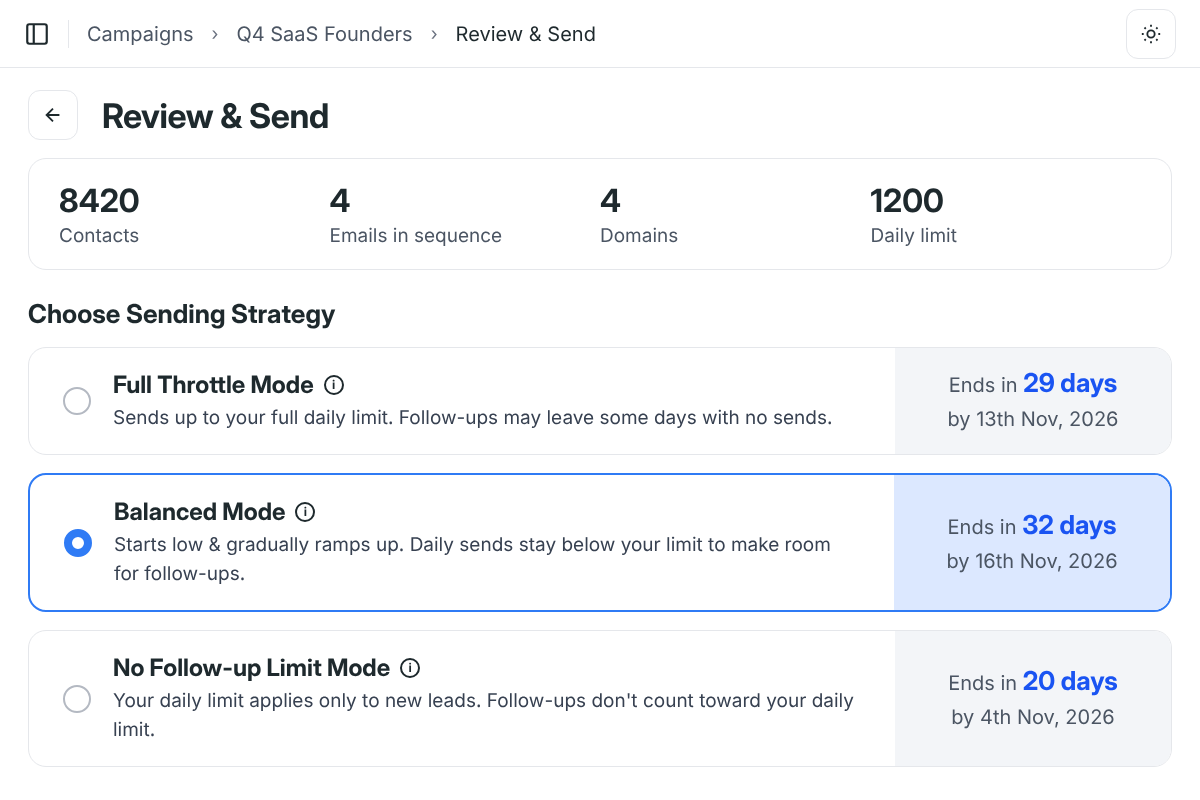
Full Throttle Mode
Sends up to your full daily limit. Follow-ups may leave some days with no sends.
Daily sends vs. your limit (dashed)
Each batch works through the whole sequence, so some days sit idle while follow-ups wait.
Campaign finishes in29 days
Balanced Mode
RecommendedStarts low & ramps up, keeping daily sends below your limit for follow-ups.
Daily sends vs. your limit (dashed)
Smooth, consistent volume every day. The best choice for your sending reputation.
Campaign finishes in32 days
No Follow-up Limit Mode
Your daily limit applies only to new leads. Follow-ups don't count toward it.
Daily sends vs. your limit (dashed)
The fastest finish. Volume can rise above your limit, which carries more risk for reputation.
Campaign finishes in20 days
Your days, your hours.
Spread evenly.
Your strategy sets how much goes out each day. Your schedule sets when, and Deliveryman spaces emails across the window instead of sending them all at once.
Sending days
Pick the days of the week your campaign sends on.
Timezone
Set the timezone your sending window follows.
Time window
A window of 3+ hours, with emails spread evenly.
You can also schedule a campaign to start at a set date and time.
Select the days to send your email campaign on:
Select time range to send emails:
Choose a start & end time (must be at least 3 hours apart).
From
9:00 AMTo
5:00 PMTimezone
America/New_York (GMT -4 UTC)From sequence to send date
in four steps.
- 1
Build your sequence
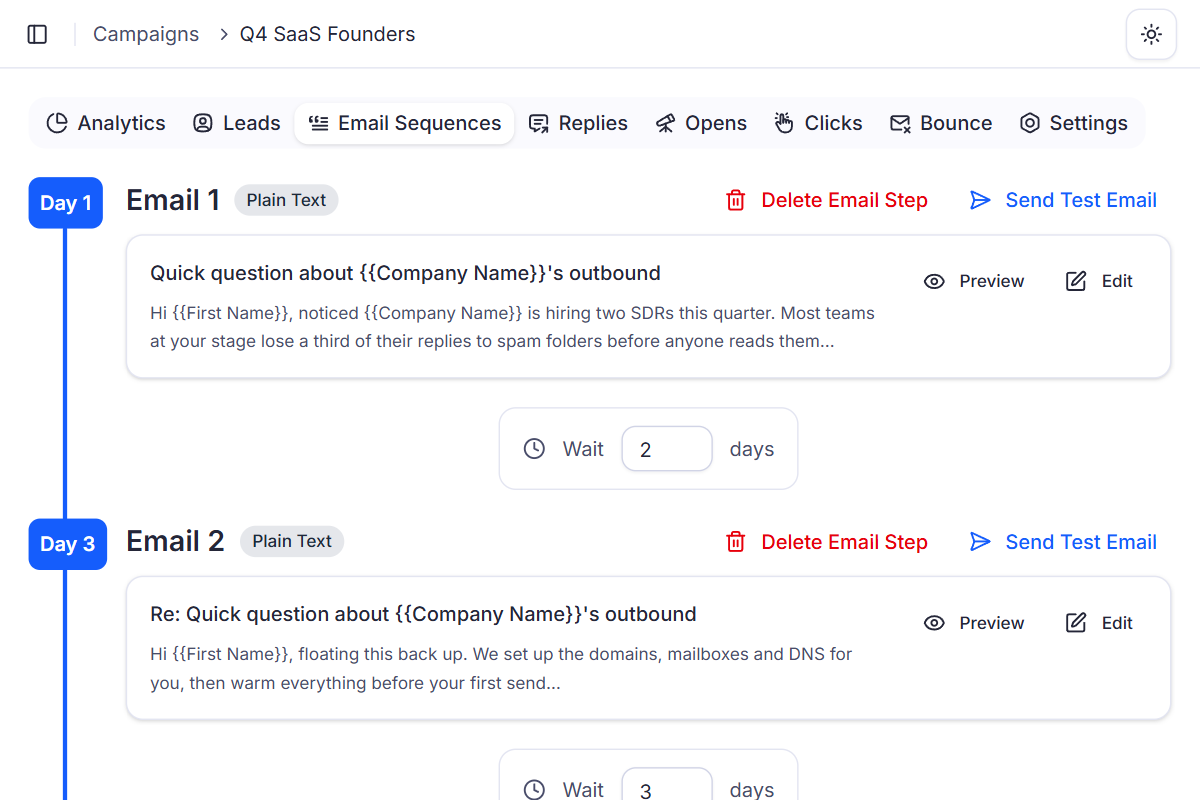
Add your emails and the wait in days between each step.
- 2
Set your schedule
Choose sending days, a timezone and a window of at least 3 hours.
- 3
Open Review & Send
See your contacts, emails in sequence, domains and daily limit.
- 4
Pick a mode and launch
Compare each mode's end date, choose one and start sending.
Why sending strategies beat a single daily cap
A fixed daily cap leaves you guessing how follow-ups fit in and when a campaign will end. In Deliveryman, you pick the trade-off between speed and steady volume, and see the end date first.
 Deliveryman
Related features
All features → Send at the pace that suits you.
Every sending strategy comes with every Deliveryman plan, alongside unlimited campaigns, mailboxes, warmup and everything else you need.
Frequently Asked Questions
What is a sending strategy?
It decides how new emails and follow-ups share your daily sending limit. You pick one of three modes on the Review & Send screen before you launch a campaign: Full Throttle, Balanced or No Follow-up Limit.
Which mode should I choose?
Balanced Mode is recommended for most campaigns. It starts low, ramps up gradually and keeps daily sends below your limit to leave room for follow-ups, which gives smooth, consistent volume and is the best choice for your reputation.
Why can Full Throttle Mode take longer?
Full Throttle sends up to your full daily limit, then each batch completes the whole sequence. While follow-ups wait for their scheduled day, some days can have no sends at all, so the campaign can finish later overall.
Is No Follow-up Limit Mode risky?
It's the fastest mode, because your daily limit applies only to new leads and follow-ups go out on top. That also means daily volume can spike above your limit, which carries more risk for your sending reputation.
How do I know when my campaign will finish?
The Review & Send screen shows an estimated end date for every mode. For example, a campaign to 8,420 contacts with 4 emails in the sequence, 4 domains and a 1,200 daily limit ends in 29 days with Full Throttle, 32 days with Balanced and 20 days with No Follow-up Limit.
Can I control when emails go out?
Yes. Choose your sending days, a timezone and a time window of at least 3 hours. Emails are spread evenly inside the window, and you can schedule a campaign to start at a set date and time.