Your whole sending stack.
Run for you.
Subdomains, mailboxes, IP pools, warmup and monitoring in one place, growing every time you connect a domain.
One place, instead of five tools.
Cold email usually needs a mailbox provider, a DNS host, a warmup tool, a verification tool and a sending tool. In Deliveryman every layer is run for you, and they all work together.
Domain & DNS
Connect a domain and every record it needs is created and kept aligned for you.
How setup worksgetnorthwind.comSPFDKIMDMARCMXPTRSubdomains
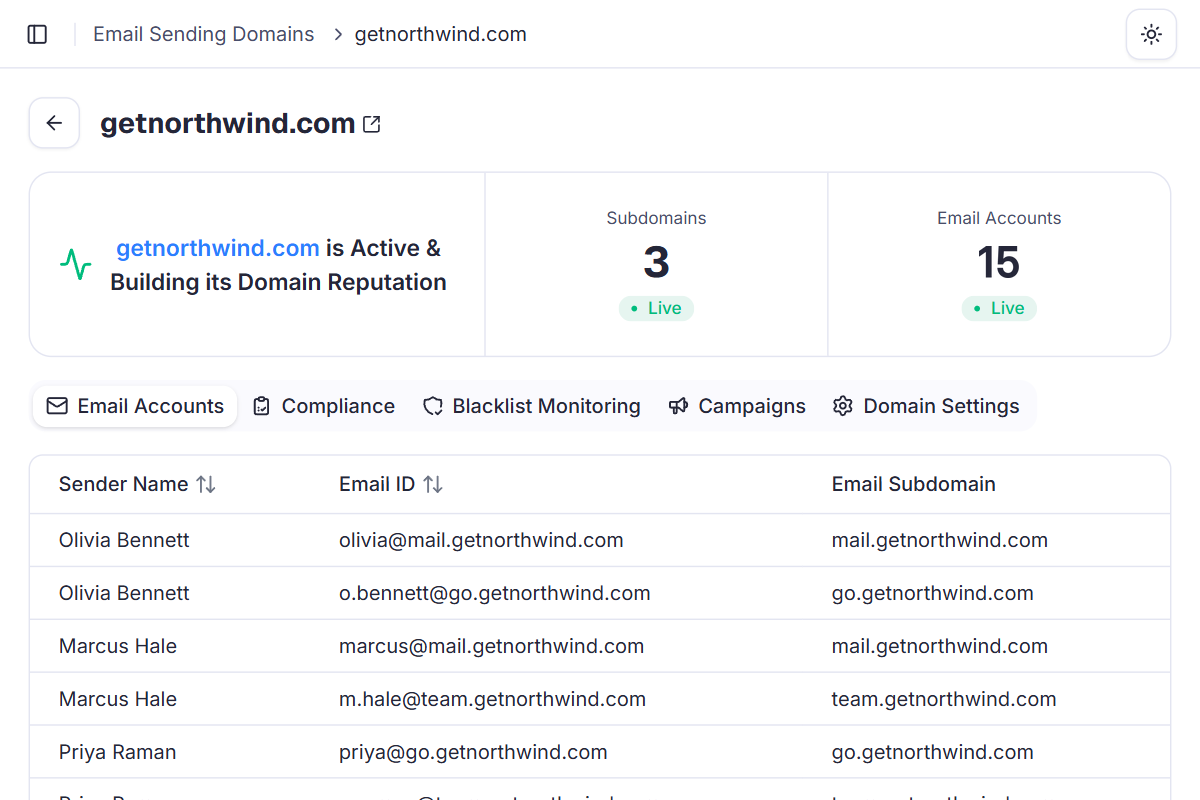
3 sending subdomains per domain, each building its own reputation.
mail.getnorthwind.comgo.getnorthwind.comteam.getnorthwind.comMailboxes
5 mailboxes on each subdomain, 15 per domain. Campaigns rotate between them automatically.
Olivia BennettMarcus HalePriya RamanDaniel BrooksEmma CarterDedicated IP pools
Mail goes out through pre-warmed IPs open only to vetted senders, with volume spread across them.
About IP poolsPre-warmedMonitoredNatural rotationWarmup & monitoring
Warmup runs daily for every mailbox, and every domain is scanned against 80+ public blacklists.
Daily warmupBlacklist scansCampaign protection
Included in every plan. Nothing to buy, host or connect.
Built to spread risk,
and to grow with you.
Subdomains isolate risk
Each subdomain builds its own reputation. If one has an issue, at worst that subdomain takes the hit, not your whole domain.
getnorthwind.com
- mail.getnorthwind.comUnaffected
- go.getnorthwind.comContained
- team.getnorthwind.comUnaffected
Mailboxes take turns
Every campaign rotates between your mailboxes automatically, so each one sends only a few emails a day and no single mailbox carries the volume.
Q4 SaaS Founders
RotatingSame small load on every mailbox, every day.
More domains, more sending
Each domain you connect adds 3 subdomains and 15 mailboxes, and you set a daily limit of 10 to 100 emails per domain for each campaign. To send more, add a domain. Everything else is set up for you.
- 1315100
- 2630200
- 41260400
- 824120800
Per campaign, at the 100-a-day limit per domain.
Warmup never stops
Reputation building starts the moment a domain connects. After 14 days you can send campaigns, and warmup keeps running daily for every mailbox, even while campaigns run.
Watched every day
Every domain is scanned against 80+ public blacklists every day. Campaigns pause on a high-severity listing and cancel if bounce rates pass 5%, so one problem can't spread. Every contact is verified before it reaches a campaign, so bounces stay low.
Connect a domain.
Send in 14 days.
- 1
Connect a domain
Add the domain and update its nameservers. SPF, DKIM, DMARC and the rest of the DNS records are created for you.
- 2
Mailboxes are created
3 subdomains and 15 mailboxes are set up with the sender names you pick. No Google or Microsoft seats to buy.
- 3
Warmup builds reputation
Warmup starts as soon as setup finishes. After 14 days the domain is ready for campaigns.
- 4
Launch your campaigns
Campaigns rotate between your mailboxes, and every domain is checked against blacklists daily.
- 1getnorthwind.comDNS verifiedSPFDKIMDMARCMX
- 23 subdomains · 15 mailboxesCreated
- mail.getnorthwind.com5 mailboxes
- go.getnorthwind.com5 mailboxes
- team.getnorthwind.com5 mailboxes
- 3WarmupDay 14 of 14
Ready for campaigns. Warmup keeps running daily.
- 4Q4 SaaS FoundersSendingOBMHPRDBEC
Rotating across 15 mailboxes
Why a managed stack beats a patchwork of tools
Stitching together mailboxes, DNS, warmup, verification and sending means five bills, five logins and nobody watching the gaps. Deliveryman runs the whole stack as one.
 Deliveryman
Related features
All features → Connect a domain. We run the rest.
Managed infrastructure, mailboxes, IP pools and warmup come with every Deliveryman plan, and grow as you add domains.
Frequently Asked Questions
What does fully managed actually include?
Everything between your domain and the inbox: DNS records, 3 subdomains and 15 mailboxes per domain, dedicated IP pools, warmup, mailbox rotation, blacklist monitoring and campaign protection. You connect domains and write campaigns.
Do I need Google Workspace or Microsoft 365 accounts?
No. Deliveryman creates the mailboxes for you when you connect a domain, so there are no mailbox seats to buy from Google or Microsoft.
How do I send more emails a day?
Add more domains. Each domain brings 3 subdomains and 15 mailboxes, and you set a daily limit of 10 to 100 emails per domain for each campaign, so more domains means more emails per day.
Why send from subdomains instead of my domain?
Subdomains isolate risk. If one runs into an issue, at worst that subdomain takes the hit, not the whole domain or the rest of your sending.
How many emails does each mailbox send?
Only a few a day. Campaigns rotate between all the mailboxes on your domains automatically, so no single mailbox carries the volume.
Is this extra on top of my plan?
No. Managed infrastructure, mailboxes, IP pools, warmup and monitoring are included in every plan. Plan usage only counts the emails you send.