
Most cold emails get one shot, and most never get a reply. The fix is a cold email sequence: a first email plus a few well-timed follow-ups, combined with A/B testing so you learn which version actually gets answered.
This guide shows you how to build a cold email sequence with automatic follow-ups in Deliveryman AI, how to personalise it with variables and spintax, and how to run A/Z tests with up to 26 variants per email. Prefer to watch? The full walkthrough is below.
What is a cold email sequence?
A cold email sequence is a series of emails sent to the same lead over several days. Email 1 introduces you. Each follow-up goes out only if the lead hasn’t replied, after a wait you choose. When a lead replies, the rest of their sequence stops automatically, so nobody who answered gets another pitch.
Follow-ups matter because people are busy. Your first email can arrive at the wrong moment and get buried. A short, polite follow-up a few days later gives it a second chance.
How to build a cold email sequence in Deliveryman AI
Step 1: Open the Email Sequences tab
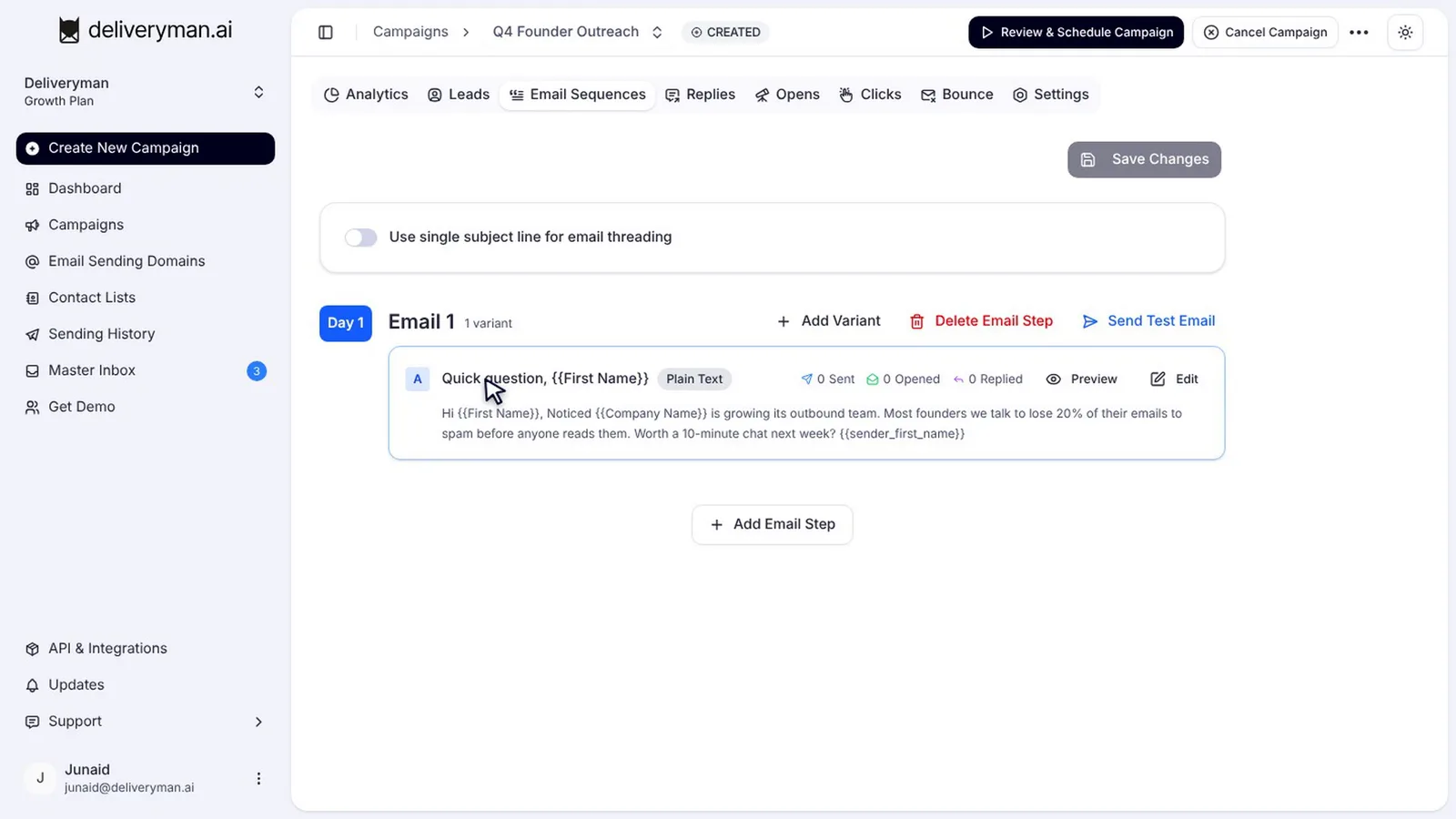
Open your campaign and go to the Email Sequences tab. Each step in the sequence is one email. Email 1 goes out on Day 1, and every email can have up to 26 variants, A through Z.
Step 2: Write your first email
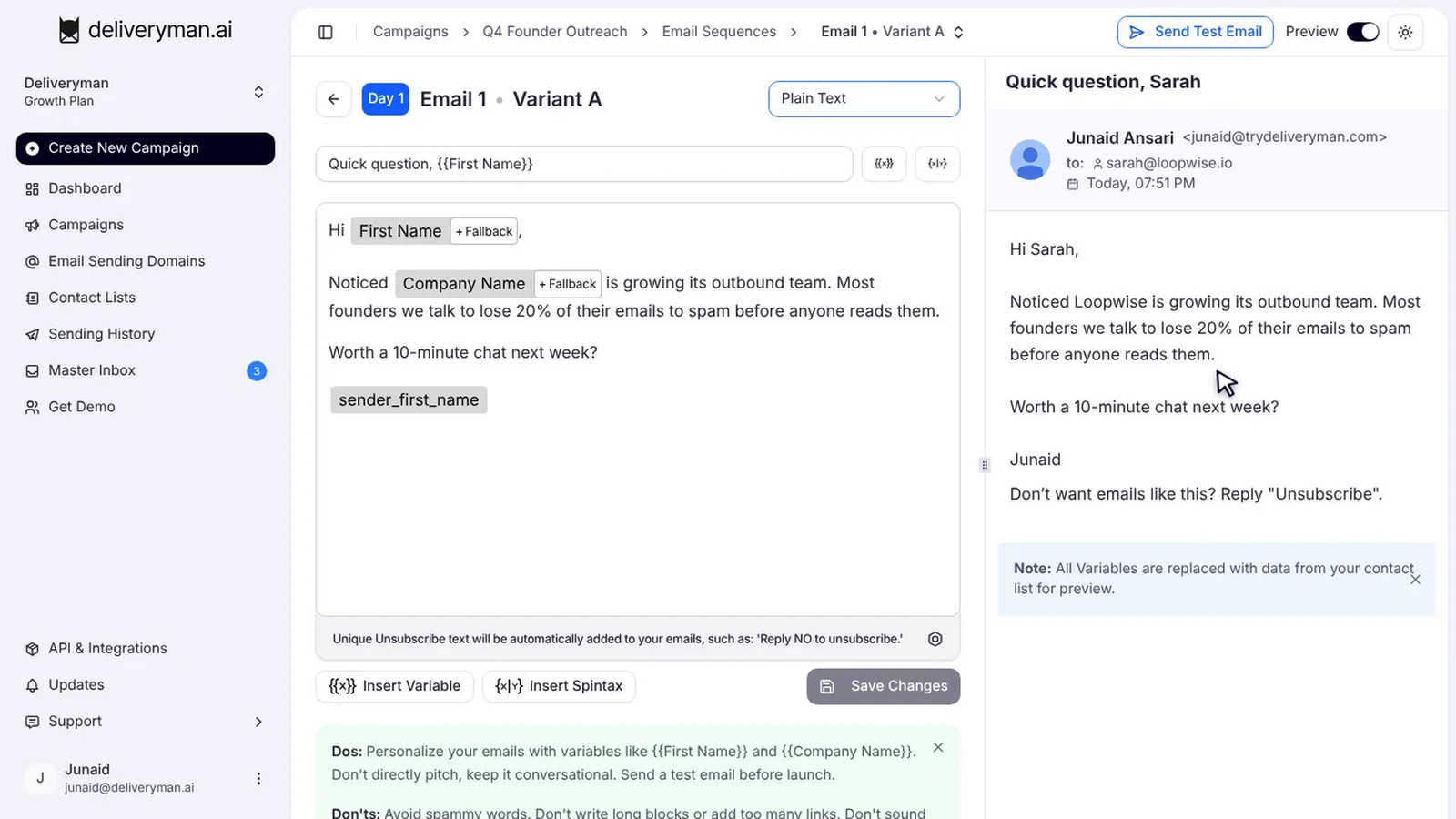
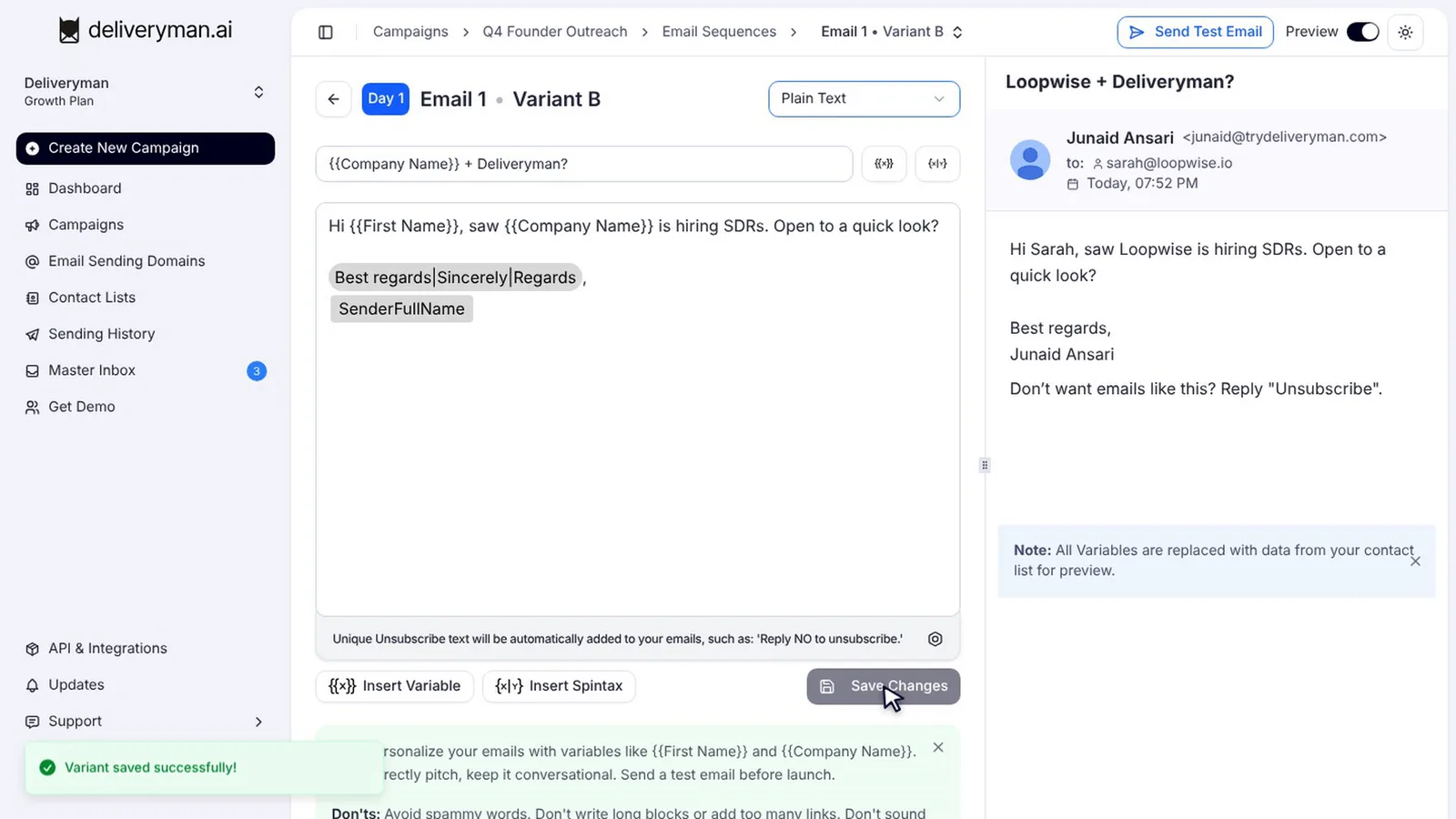
Click Edit to open the editor. Write your subject and body on the left, and use the tools under the editor to personalise it:
- Insert Variable adds details from your contact list, like first name or company name.
- Insert Spintax adds variations of a phrase, so no two emails look identical.
- Live preview on the right shows exactly what your lead will see, with real data filled in.
Keep the first email short and specific. In our 46% reply rate case study, 98.8% of replies came from a short, plain-text first email.
Step 3: Add follow-ups and wait days
Click Add Email Step to add a follow-up, then set how many days to wait before it sends. Write a short follow-up, a line or two that bumps the conversation, and save.
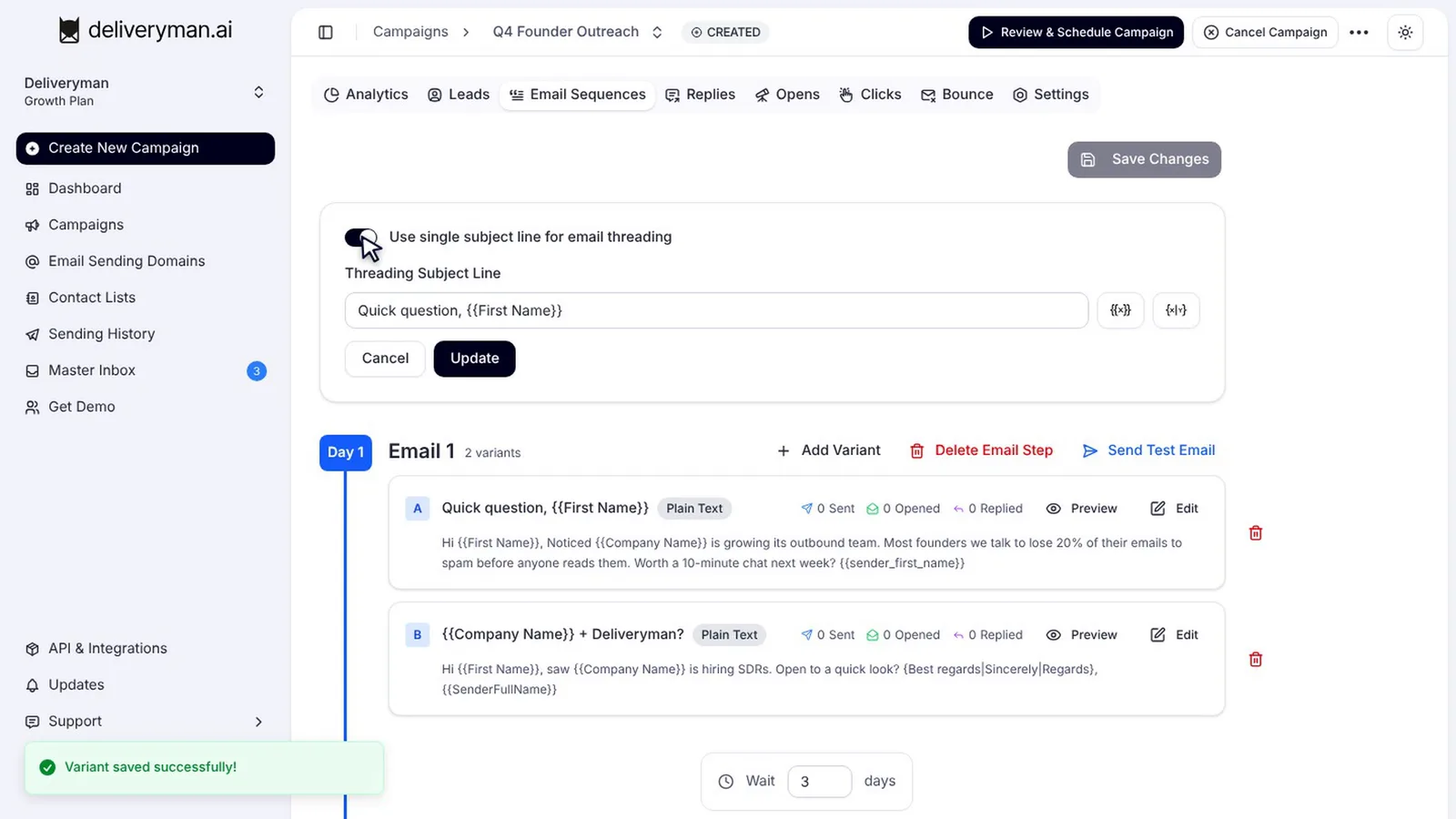
To keep every follow-up in the same email thread, turn on Use single subject line for email threading. Your follow-ups then arrive as replies to the first email, which reads naturally and keeps the context in one place.
Step 4: Send a test email
Before you launch, click Send Test Email to see the email in your own inbox, then hit Save Changes. Check that the variables filled in correctly, the links work and the formatting looks right on mobile.
How to A/B test cold emails (A/Z testing)
A/B testing means sending different versions of the same email to different leads and comparing the results. Deliveryman takes it further with A/Z testing: up to 26 variants for every email in your sequence.
Add a variant
Click Add Variant to create variant B. Give it a different angle: a new subject line, a different opening line or a different call to action. Save it, and Deliveryman rotates your leads across every variant automatically.
Read the results per variant
Once the campaign is running, each variant shows its own sent, opened and replied counts. In the example below, variant B is getting almost twice the replies of variant A, and variant C is falling behind.
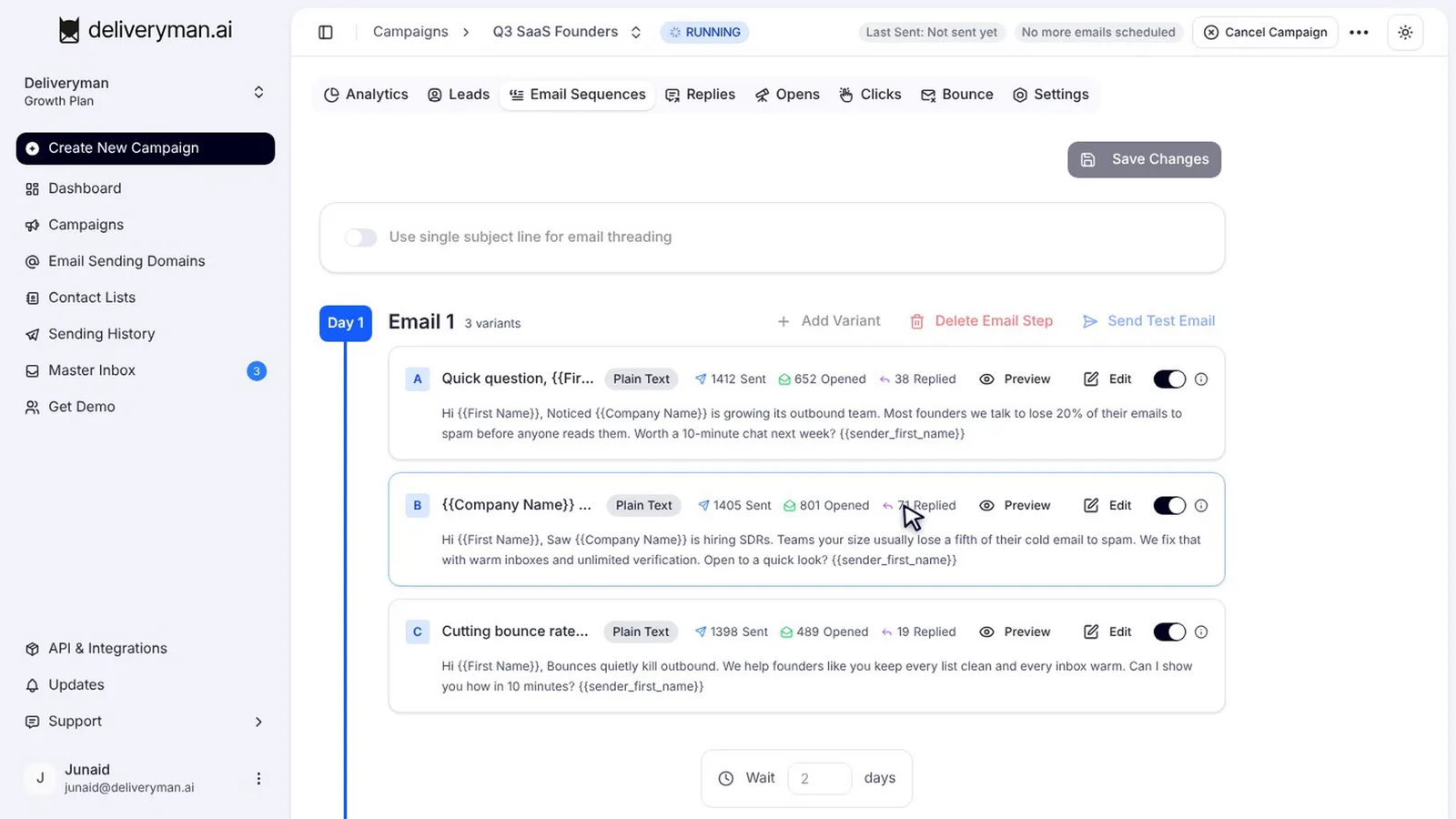
Judge variants on replies, not opens. Opens are inflated by bot scanners and privacy features like Apple Mail Privacy Protection, which is why we built bot open filtering.
Switch off the losing variants
To drop a weak variant, switch it off. Its remaining emails are redistributed to the variants still running. This can’t be undone, so wait until each variant has enough sends to compare fairly. Then add a new variant to test the next idea, and your sequence keeps getting better.
Cold email sequence best practices
- Three to four steps is plenty for most campaigns: a first email and two or three follow-ups.
- Space follow-ups out. Two to four days between steps is a common starting point.
- Make every follow-up shorter than the last. Don’t repeat the whole pitch.
- Test one thing at a time. If variant B changes both the subject and the body, you won’t know which change worked.
- Personalise beyond the first name. Use company, role or a relevant detail from your list.
- Respect opt-outs. Set up unsubscribe text in the campaign’s Unsubscribe settings, because laws like CAN-SPAM require you to honour them.
Frequently Asked Questions
How many variants can I test per email?
Up to 26 variants per email step, labelled A through Z. Deliveryman rotates leads across all active variants automatically.
What happens when a lead replies?
The rest of their sequence stops, so they don’t receive any more follow-ups from that campaign.
Can I edit a sequence after the campaign starts?
You can edit the content of emails that haven’t been sent yet, but you can’t add or remove steps while the campaign is running. Our guide to managing a live campaign covers what’s editable.
Should my follow-ups use the same subject line?
Usually yes. A single subject line keeps the sequence in one thread, so each follow-up has the context of the first email.
Next steps
A great sequence needs somewhere to send from and someone to send to. Learn how to set up a cold email campaign from start to finish, then choose a cold email sending strategy that fits your timeline.